Mon – Sat: 9:00 AM – 7:00 PM IST

Cross-Platform Mobile App Development

One codebase is a means, not a goal. This page is about when it is the right one.

Cross-platform is usually sold as a cost saving and bought as a speed decision. Both are true and neither is the whole story, because the saving is real for most of an app and disappears entirely for certain parts of it. This page sets out which parts, how the main toolkits differ, and when native is still the honest recommendation.

Free Proof of Concept An honest recommendation, including “go native” 15+ years across four generations of toolkit
The premise

What actually shares, and what never will

The cross-platform promise is one codebase. The reality is one codebase for most of the app and two of several other things, and knowing which is which is the difference between a realistic plan and a disappointed one. Roughly four-fifths of a typical business application shares cleanly. The remaining fifth is where the estimates go wrong.

  • Shares cleanly: business logic, networking, local storage, state management, navigation, validation, most of the user interface
  • Shares with care: design conventions, gestures, fonts and dates — identical is not always correct on both platforms
  • Does not share: store release, signing, permissions wording, push notification setup, deep links, background execution
  • Needs native code: unusual hardware, platform widgets, watch apps, anything the plugin ecosystem has not already solved
  • Never shares: review. Two stores, two policies, two sets of rejections

One codebase, two release processes. Any plan that assumes one of each will slip.

The options

Four routes, compared on what they cost you

Flutter

Draws its own interface, so a screen looks identical everywhere and you control every pixel. Strong offline and animation story, one language across the stack, and a dependency tree that stays manageable. The trade is that platform conventions are something you implement rather than inherit.

React Native

Renders real platform components, so the app inherits native feel and accessibility for free. The obvious choice if your organisation already runs on React and TypeScript, because the team and the tooling transfer. The trade is a larger, faster-moving dependency surface.

Kotlin Multiplatform

Shares the logic, leaves each interface native. The highest ceiling for native feel and the smallest saving, because you write two user interfaces. Natural where Android expertise already exists and the shared rules are substantial.

Native, twice

Two codebases, two teams, full access to everything on day one. Still the right answer for graphics-heavy, hardware-heavy or deeply platform-integrated products — and the wrong one for most business applications.

Where it stops working

Five places cross-platform is the wrong call

We would tell you this in an assessment. It is cheaper for both of us if you read it first.

Sustained high frame rates

Games, continuous 3D, anything redrawing complex scenes every frame. The abstraction costs something, and in this one category it costs enough to matter.

Real-time camera and audio processing

Augmented reality, live filters, continuous computer vision on the preview buffer, low-latency audio. These live close to the metal and the bridge is in the way.

Serious background behaviour

Continuous location, geofencing, long-running uploads under aggressive power management. Possible cross-platform, but so much of it ends up as native code that the saving evaporates.

Widgets, watches and extensions

Home-screen widgets, watch apps, share sheets and app clips are written natively regardless of what the main app uses. Fine — just do not expect to share them.

A single-platform product

If the app will only ever exist on one platform, cross-platform is an abstraction you are paying for and not using. Build it native.

Getting there

Migrating an existing native app without a rewrite

Measure before you move

Which screens change most often? Which carry the defects? Which are duplicated between Android and iOS with the same behaviour and different bugs? That list, not a preference, is what should drive the order of migration.

Embed, do not replace

Both major toolkits can run inside an existing native application. Start with one self-contained flow, ship it to a fraction of users, and compare crash rates and ratings against the native version before going further.

Move the logic before the screens

Shared business rules, validation and networking deliver most of the duplication saving and carry the least visual risk. Screens can follow once the foundation is proven.

Leave the native parts native

The payment integration that works, the camera pipeline somebody tuned for two months, the widget. A hybrid app is not a failed migration — it is usually the correct end state.

Team

What it means for hiring and for the people you have

One team, both platformsThe organisational saving is larger than the code saving. One backlog, one standup, one release conversation, and no arguing about which platform is behind.
You still need native literacySomebody has to read a native stack trace, handle signing and answer a review rejection. A team with no native experience is fine until the first week it is not.
Retraining is realisticAn experienced Android or iOS engineer picks up either toolkit in weeks, because the hard-won knowledge — lifecycle, permissions, store behaviour, device quirks — transfers intact.
Hiring depth differs by cityIn most Indian metros the cross-platform pool is larger and less expensive than the senior iOS pool. That is a legitimate input to the decision, and it is not the only one.
One codebase

The same code, running on both stores

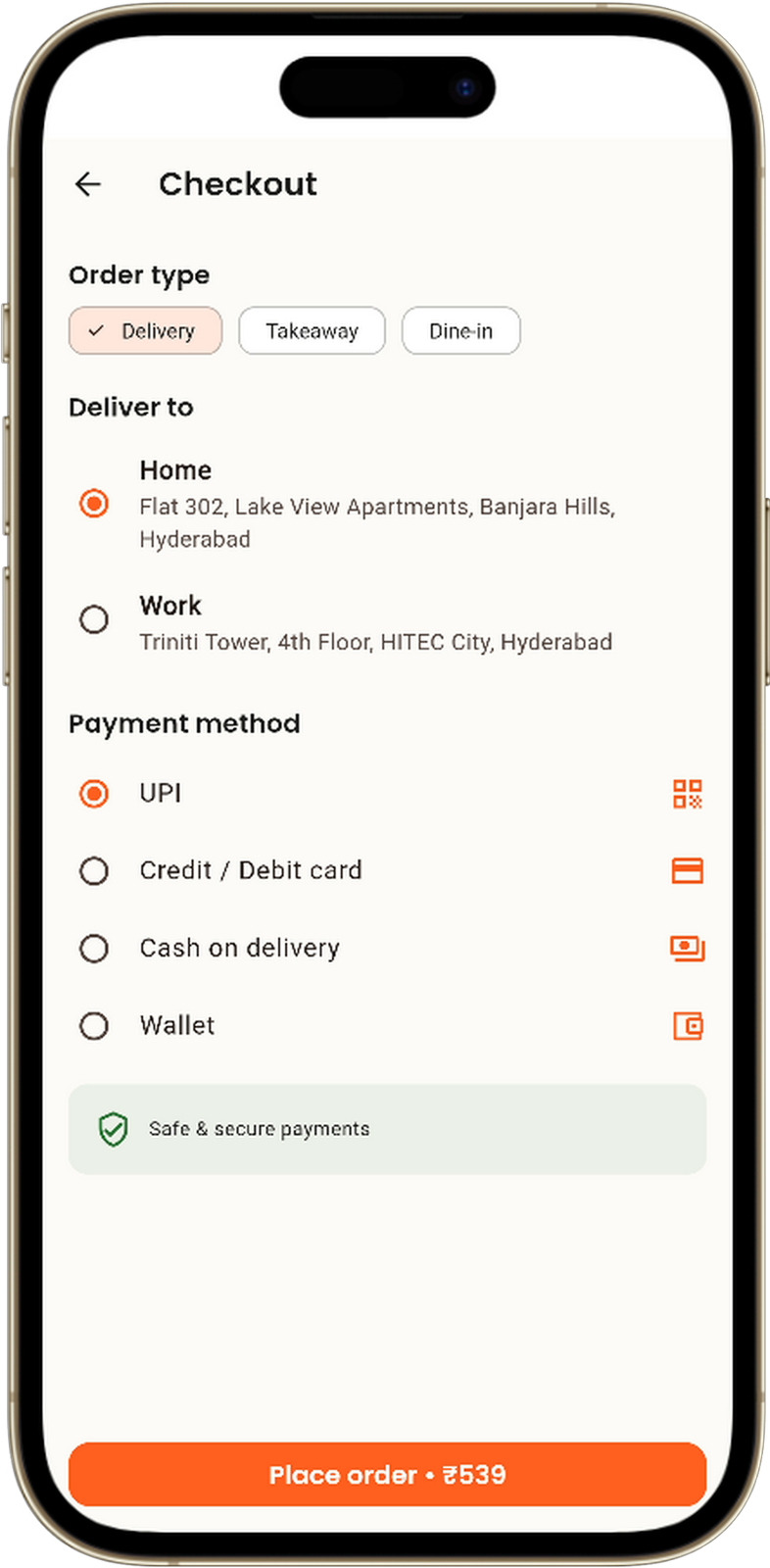
Every screen below is live on Android and iOS from a single codebase, built and released by one team. The three-quarters of an app that shares cleanly looks exactly like this. Tap any image to enlarge it.
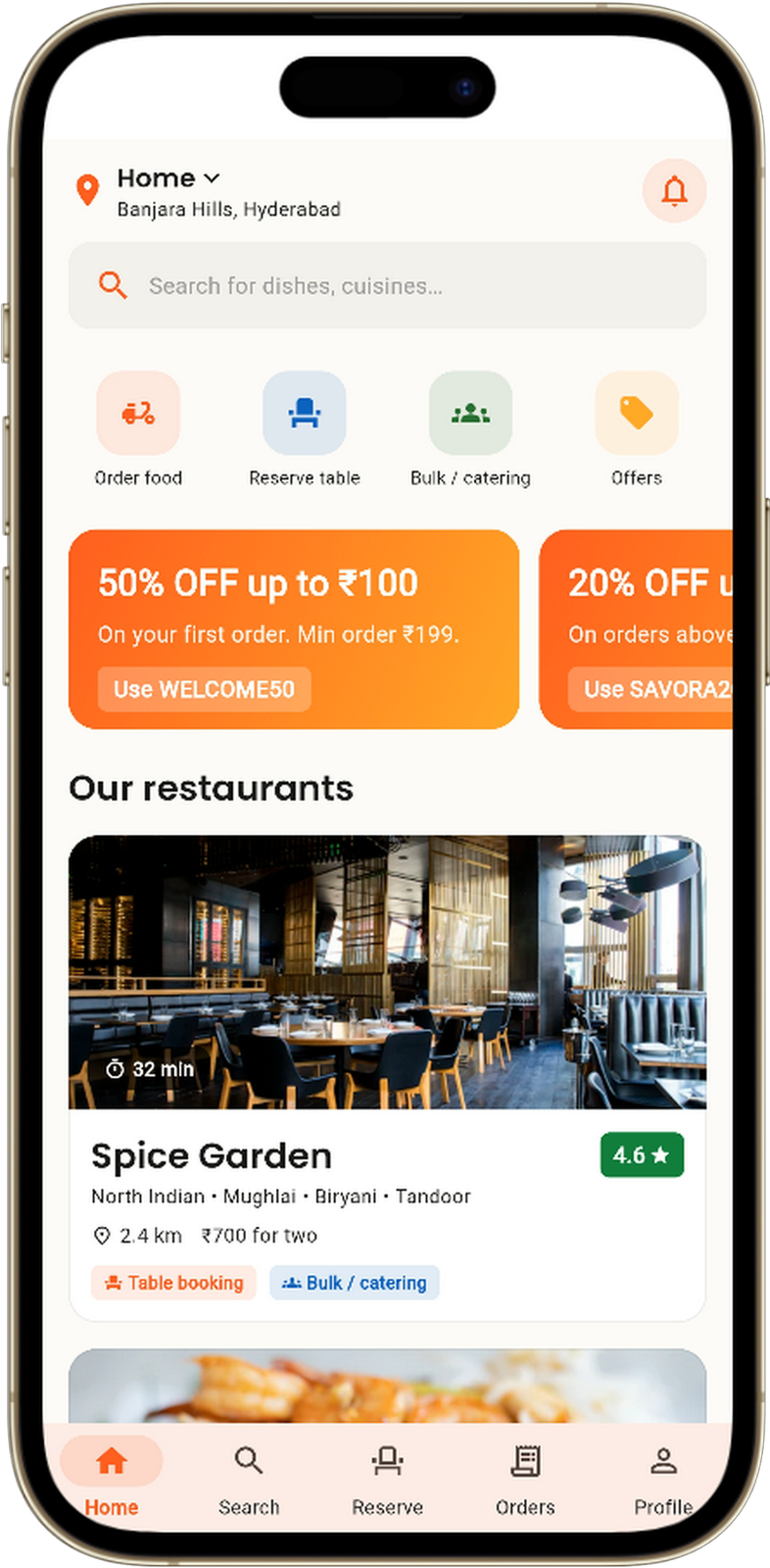
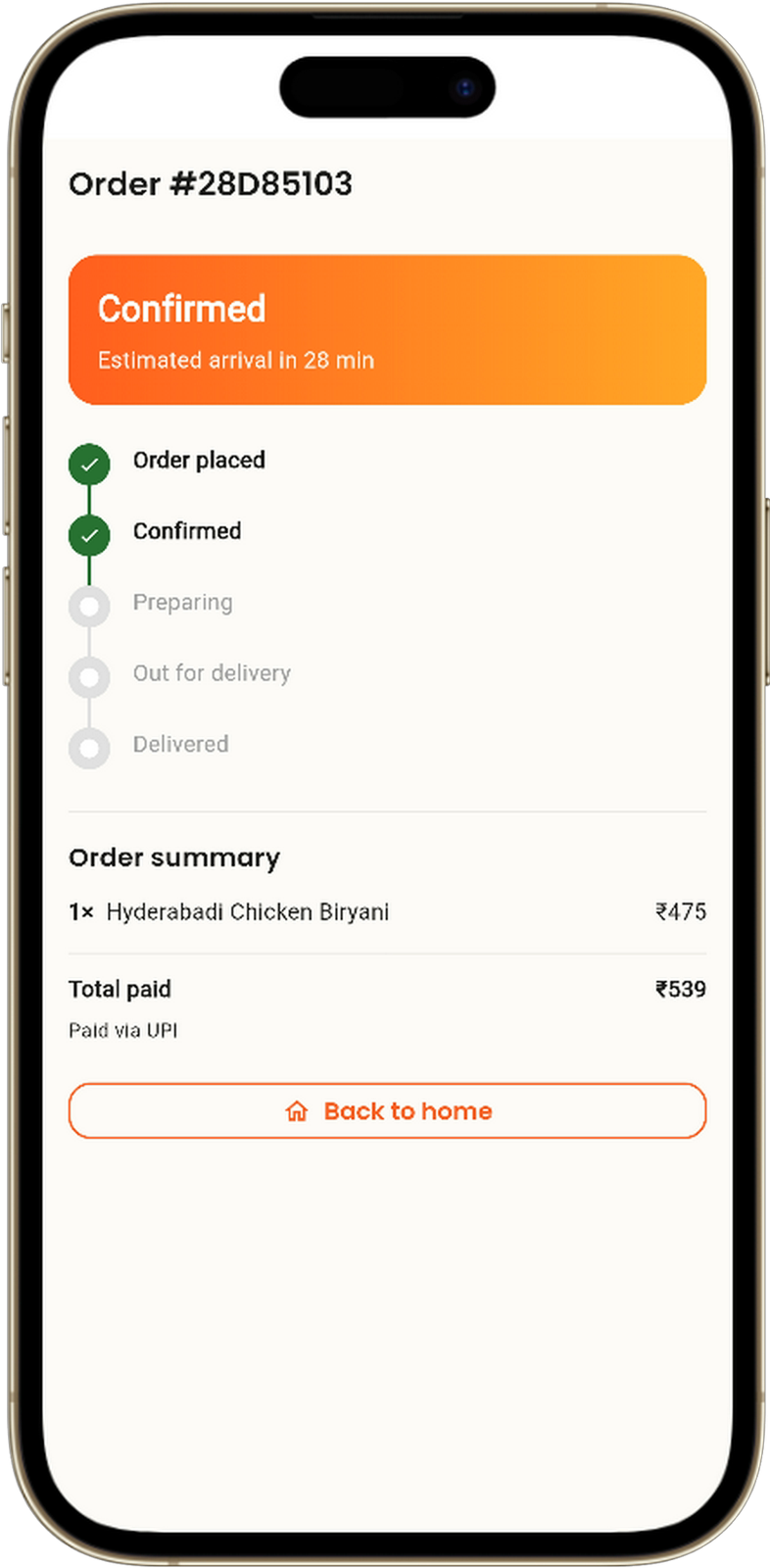
Food ordering app home screen rendered from a shared codebase
Shared: the whole screenLayout, state, data fetching and navigation written once. This is the part of an app where cross-platform simply wins, and it is most of the app.
Checkout screen combining shared logic with native payment
Shared logic, platform paymentThe flow and validation are shared; the payment sheet is native on each platform because it has to be. A platform channel, not a compromise.
Order tracking screen with a native map view
Shared, with a native mapTracking logic is common code. The map underneath is the platform’s own, reached through a maintained plugin rather than reimplemented.
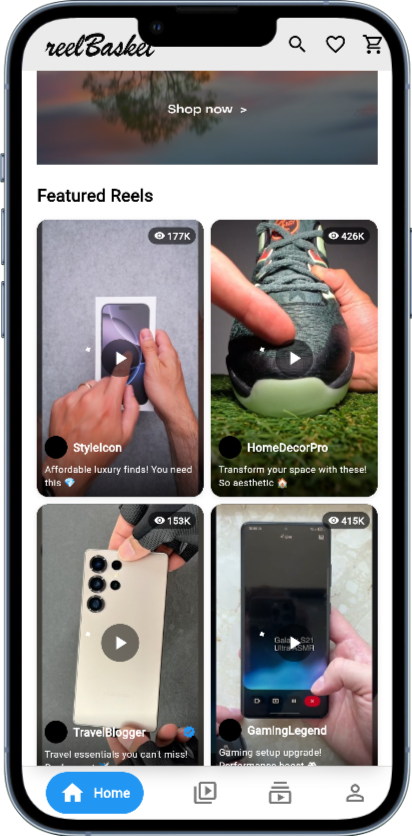
Video feed home screen in a social commerce app
Where rendering choice showsA video feed is the test of a cross-platform toolkit. Smooth scrolling on a mid-range Android device is what separates a usable build from a demo.
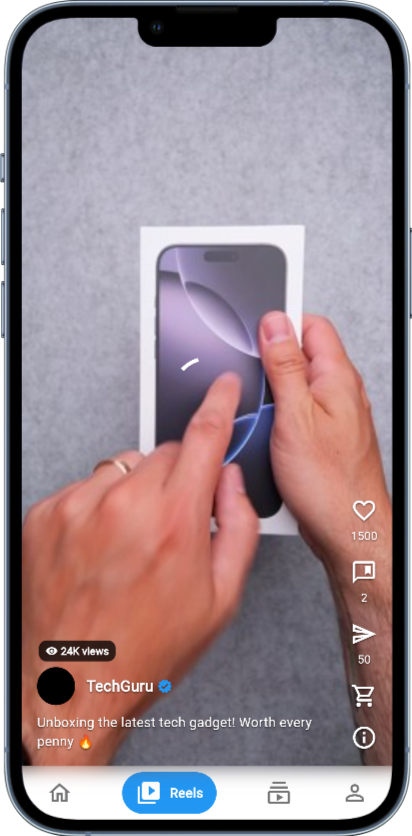
Full-screen video player in a social commerce app
Native playback, shared shellVideo decoding is the platform’s job. The player surface is native and everything around it is shared — the usual division of labour.
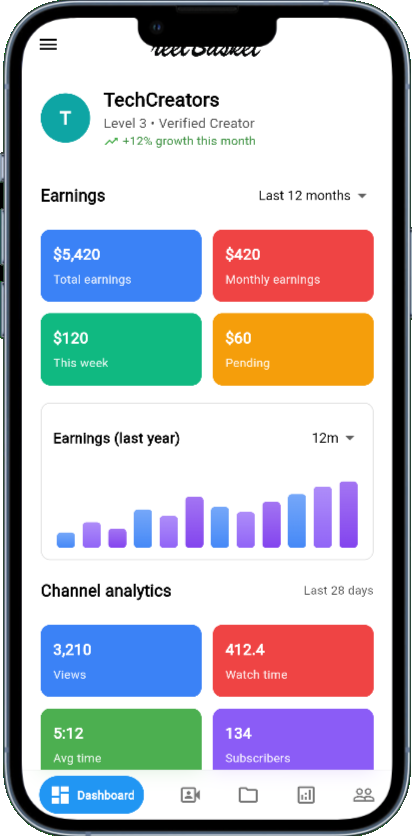
Seller dashboard screen built from a shared codebase
Two audiences, one releaseBuyer and seller experiences in one codebase and one submission. Two native teams would have shipped this twice, and on two timetables.
Questions

Frequently asked questions about cross-platform mobile app development

For most apps, yes - but the saving is nearer 30 to 40 per cent than the 50 per cent the arithmetic suggests. Business logic, networking, storage and state share almost completely. Platform integration, store release, device testing and the per-platform design polish do not. Budget for one codebase and two release processes.
React Native suits teams who already live in JavaScript and React, and whose app is largely standard interface over an API; it renders with platform components, so it inherits native feel cheaply. Flutter suits teams who want precise control of rendering and a consistent look everywhere, and who value a quieter dependency ecosystem. Both are production-grade. The honest tiebreaker is usually which one you can hire for.
It shares the logic and leaves the interface native on each platform. That is the right trade when the app is interface-heavy in a platform-specific way but has substantial shared business rules, and when you already have Android expertise. You get native feel by construction and you write two user interfaces, so the saving is smaller and the ceiling is higher.
When the app's reason for existing is deep in one platform: sustained high-frame-rate graphics, augmented reality, heavy real-time camera or audio processing, complex background behaviour, widgets and watch apps, or tight integration with platform-specific hardware. Also when the app is genuinely only ever going to exist on one platform.
Yes, through platform channels - a thin layer of Kotlin or Swift that the shared code calls. Most common hardware already has a maintained package. The thing to check during estimation is whether your specific requirement does, because writing and maintaining a channel for an unusual device is real work that belongs in the quote.
Easier in volume, harder in depth. One team covers both platforms, which is a genuine advantage. But you still need someone who can read a crash in a native stack trace, sign a release and argue with App Store review. A cross-platform team with no native experience at all hits a wall the first time something platform-specific breaks.
Usually, and rarely all at once. The pragmatic route is incremental: embed cross-platform screens inside the existing native shell, move the highest-churn areas first, and keep the platform-specific parts native permanently if they are working. A full rewrite is the riskiest version of this and the one most often regretted.
Keep reading

Where to read next

Flutter vs native, in detail

A longer comparison with the benchmarks, the trade-offs and where each genuinely wins.

Choosing an app development company

Once the technology question is settled, the vendor question: ownership, accounts and handover.

Offline mobile app development

How the cross-platform choice interacts with offline storage and sync.

What an app costs in India

Realistic ranges by app type, and what moves each figure.

We Will Tell You If Native Is Right

Describe the app. If cross-platform is the wrong answer we will say so in the assessment, at no cost.