Mon – Sat: 9:00 AM – 7:00 PM IST

Third party logistics software that bills for every touch

Win clients you can onboard in days. Charge for work you are currently giving away. Know which client actually makes you money.

MultiCommerce 3PL is warehouse and order fulfillment software with the commercial half built in — client-owned stock, contract rate cards, and a charge raised the moment a receipt, pick, pallet-day or vehicle happens.

Free proof of concept on your own rate card NDA before any detail is shared Delivering since 2015
0
Modules on one database
0
Picking strategies, chosen per order profile
0
Events that raise a charge by themselves
0
Service levels a contract can promise
Who it is for

Built for operators who hold other people’s stock

The commercial model differs more than the floor does. Each of these is priced, promised and reported differently, and all four run on one installation.

eCommerce fulfillment

D2C parcels across Shopify, WooCommerce and marketplaces, fulfilled out of shared bins. Batch and cluster picking, rate shopping, tracking written back so the shopper is emailed once.

B2B & wholesale distribution

Cases and pallets to trade buyers with appointment and pallet rules, delivery windows, credit hold and EDI. B2B and B2C can be priced on separate contract lines.

Cold chain & regulated

Temperature class enforced at putaway, FEFO issue, expiry windows, quarantine bins that are never picked, and batch or serial traceability through to the consignee.

Bonded, import & container work

Dock booking, gate passes, customs declarations with duty per line, container stuffing and de-stuffing, detention past the free hours, and duty advanced on a client’s behalf billed back at cost.

The problem

Where third party logistics operators lose money

None of these are problems on the floor. They are commercial problems the floor creates, and most are invisible until the month is closed.

Leak 01

Work done, never charged

A service nobody wrote on the sheet. It stays invisible because an unbilled job looks exactly like a billed one on screen.

What stops it

Every billable event raises its charge as it happens, and the billing analysis report has a dedicated view of work done but never charged.

Leak 02

Storage billed on what arrived

Billing from receipts rather than from what is still in the racks over-bills some clients and under-bills others, both quietly.

What stops it

A daily storage run charges pallets actually in the racks — or units, m³ or kg — and honours the free days on the contract.

Leak 03

An invoice the client cannot verify

Four summary lines and a long argument. Disputes get written off to protect the relationship rather than settled on facts.

What stops it

Each charge records where its price came from and which contract condition chose it, so an invoice opens down to the movement behind every line.

Leak 04

SLA credits paid twice

The same late despatch credited on two invoices, because a spreadsheet cannot see what an earlier period already covered.

What stops it

A breach is credited once. Days an earlier invoice covered are excluded automatically, and every service level carries its own cap.

Leak 05

Detention never recovered

A vehicle sits for three hours past its free time and nobody raises the charge, because the gate log and the invoice are different systems.

What stops it

A gate pass records the vehicle in and out. Detention past the free hours is priced per vehicle and container type, straight onto the client’s account.

Leak 06

One brand’s unit in another brand’s parcel

In a shared warehouse this is not an inventory error. It is the mistake that loses the contract.

What stops it

Stock is keyed by client at bin and batch level, and a pick sheet is never allowed to mix clients.

Leak 07

Overselling, because the storefront owns stock

A shopper buys what you do not have, and your client hears about it from their customer before they hear it from you.

What stops it

The warehouse owns the available figure and pushes it out. Free to promise is on hand less allocated, so nothing is sold twice.

Leak 08

A new client takes weeks to onboard

Every week of setup is a week of warehouse space earning nothing, and a client wondering whether they chose well.

What stops it

A client is a record, a rate card and a channel connection with a Test that proves the credentials before an overnight run does.

Leak 09

Nobody knows which client is profitable

You find the loss-making account at renewal, having just repriced it on instinct and signed for another year.

What stops it

Revenue is known; cost is modelled from labour rates, rent per m³, packaging and standard minutes per task, converted to one currency first.

Why it is different

A 3PL system is not a WMS with extra fields

If you own the stock, a warehouse system answers one question: where is it. If you are holding it for somebody else, three more matter — whose is it, what did you agree to charge for touching it, and has that reached an invoice.

Most warehouse software answers the first and leaves the rest to a spreadsheet. That spreadsheet is where the margin goes: work recorded on paper, storage estimated, credits argued, and an invoice nobody can reconcile.

Here the commercial layer is not an add-on. Every unit carries its client, every movement carries its price, and the invoice is an assembly of charges that already existed.

The flow

The warehouse day, gate to invoice

Each stage causes the next, and every one writes something specific. Nothing in the chain depends on a spreadsheet kept beside it.

A client says a load is coming

Inbound › Advance Shipping Notices

The expectation only. No stock moves, but the notice is what makes scan-based receiving and planned cross-docking possible.

The vehicle arrives

Inbound › Goods Receipts

Stock into staging, and the inbound handling charge raised the moment the receipt is confirmed. Short, over and damaged quantities are recorded at the dock.

Goods go into bins

Inbound › Putaway

Stock out of staging into a bin, and only now is it sellable. Auto-allocate proposes the location from the item’s storage class, weight and pallet rules.

Orders arrive

Outbound › Orders, or a sales channel

The order and its SLA ship-by hour, whether it came in by webhook, a scheduled pull, the portal or the keyboard.

The stock is promised

Allocate, on the order

Reservations against free stock, FEFO then FIFO. The units stay physically in their bins, so nothing is promised twice.

Somebody walks the floor

Outbound › Pick Lists

Stock leaves its bin, in pick-sequence order so the sheet is a route rather than a scavenger hunt. A blank line is not picked in full.

It gets boxed

Outbound › Packing

The package with its real and volumetric weight — which is what the carrier will actually bill on.

It is handed over

Outbound › Shipments and Manifests

The carrier booking, the waybill, and the outbound and freight charges. A failed booking leaves no number rather than an invented one.

Some of it comes back

Returns

Good stock back on the shelf, damaged held aside, and the returns handling charge raised per unit against the original despatch.

You get paid

Billing › Charges, Client Invoices

One invoice assembled from the period’s charges, less SLA credits, topped up to the contract minimum — every line traceable to the movement that made it.

Product Screens

A look inside MultiCommerce 3PL

Seventeen screens from the running system, in the order the work happens, from the gate to the invoice. Click any one to open it full size.

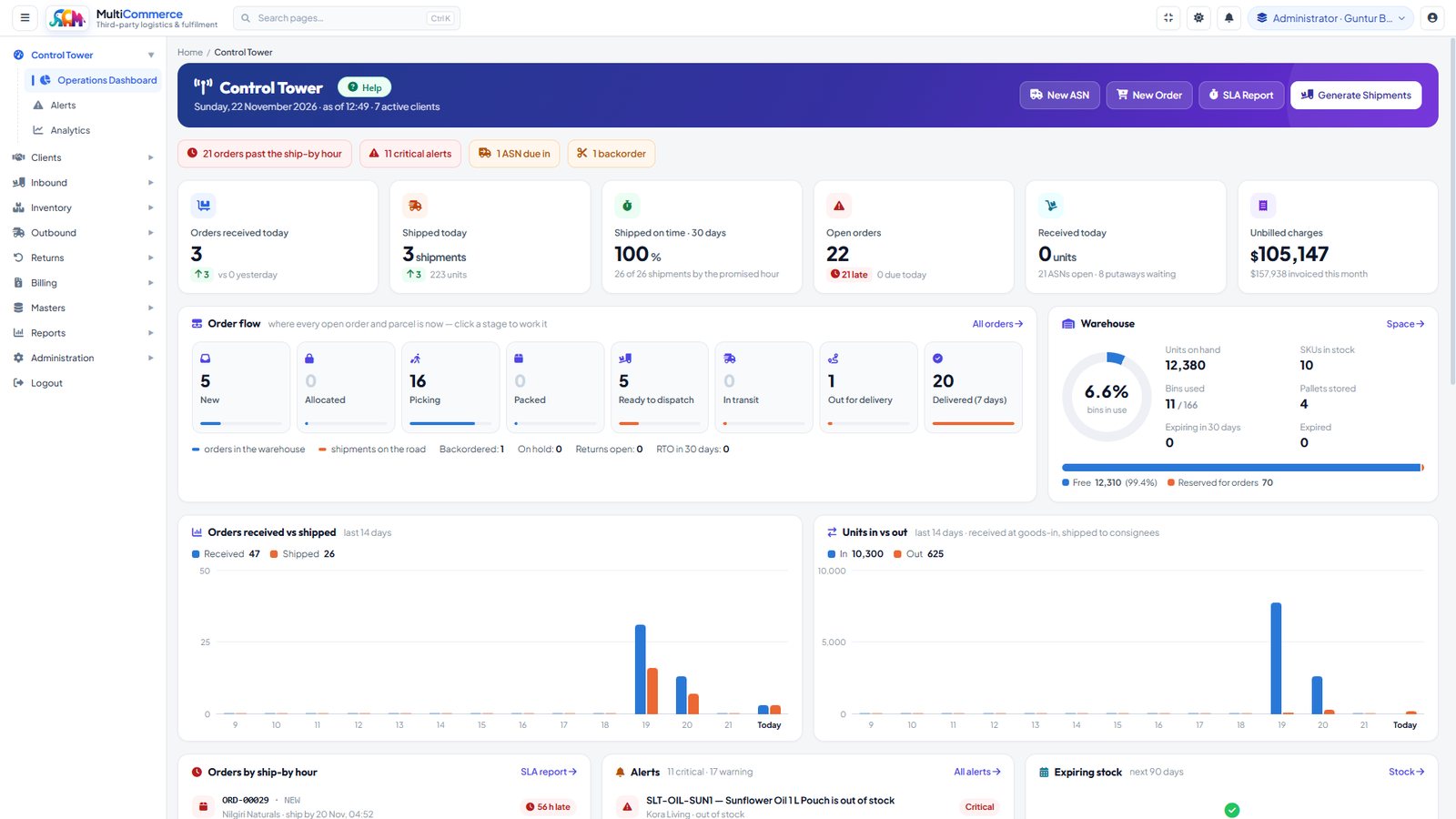
Control Tower — The day on one screen — orders past their ship-by hour, critical alerts and backorders up top, today against yesterday, ever
Control TowerThe day on one screen — orders past their ship-by hour, critical alerts and backorders up top, today against yesterday, every open order and parcel by stage, how full the warehouse is, and fourteen days of orders and units in and out.
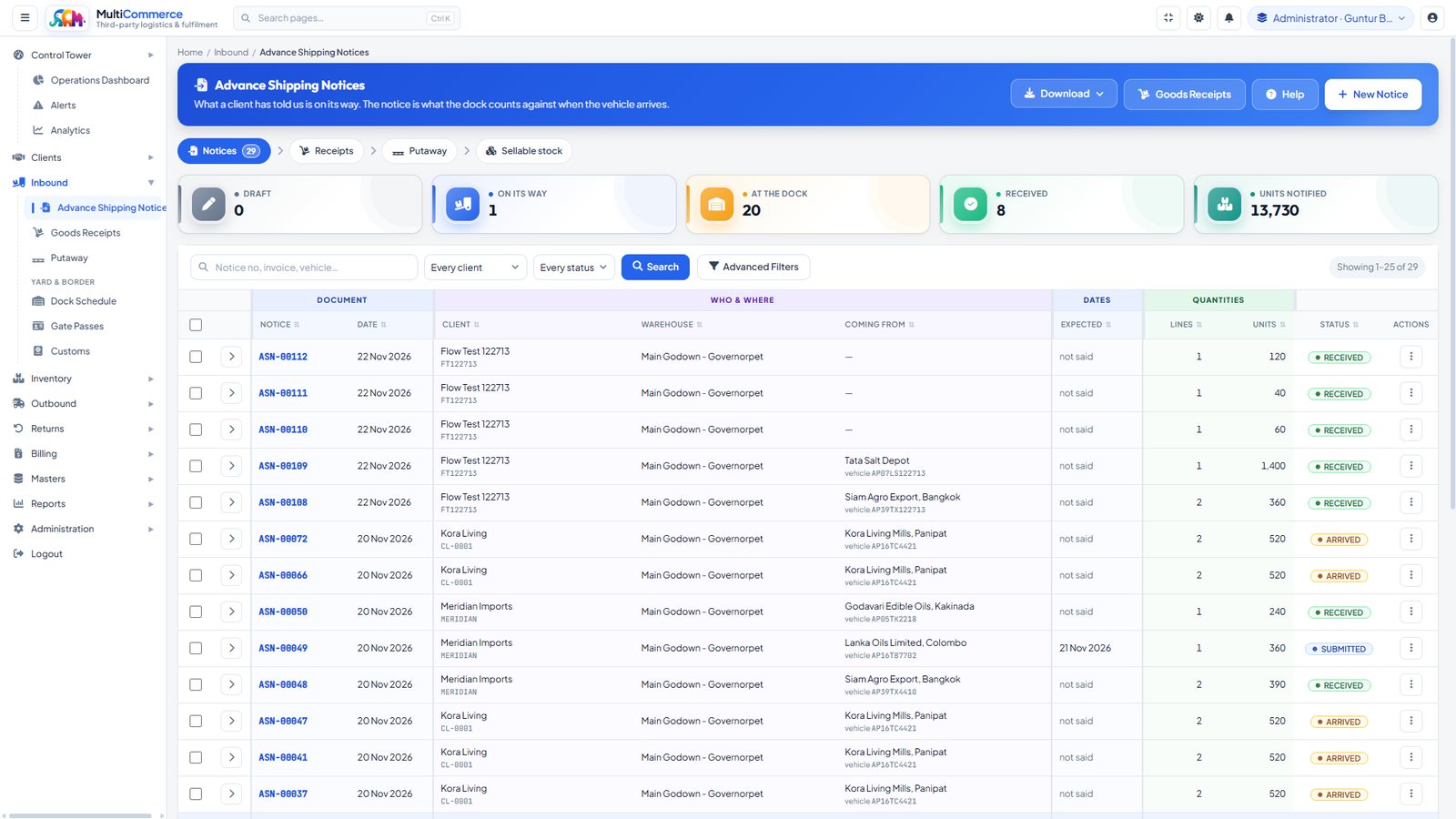
Advance Shipping Notices — What a client has told us is on its way — supplier, vehicle, lines and units — followed from draft to on its way,
Advance Shipping NoticesWhat a client has told us is on its way — supplier, vehicle, lines and units — followed from draft to on its way, at the dock and received. The dock counts against this notice when the vehicle arrives.
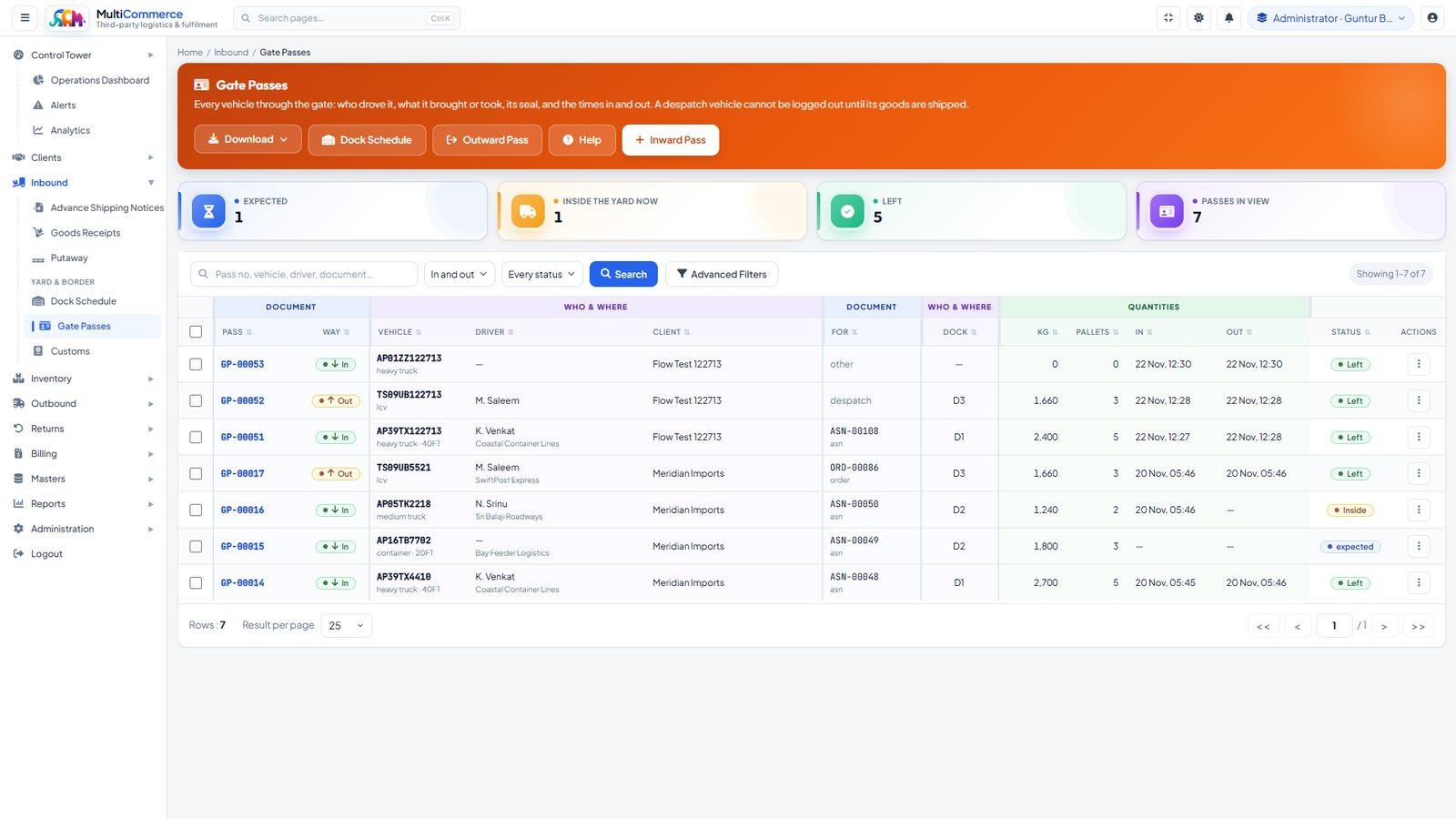
Gate Passes — Every vehicle through the gate: who drove it, what it brought or took, its dock, pallets and weight, and the times in and out.
Gate PassesEvery vehicle through the gate: who drove it, what it brought or took, its dock, pallets and weight, and the times in and out. A despatch vehicle cannot be logged out until its goods are shipped.
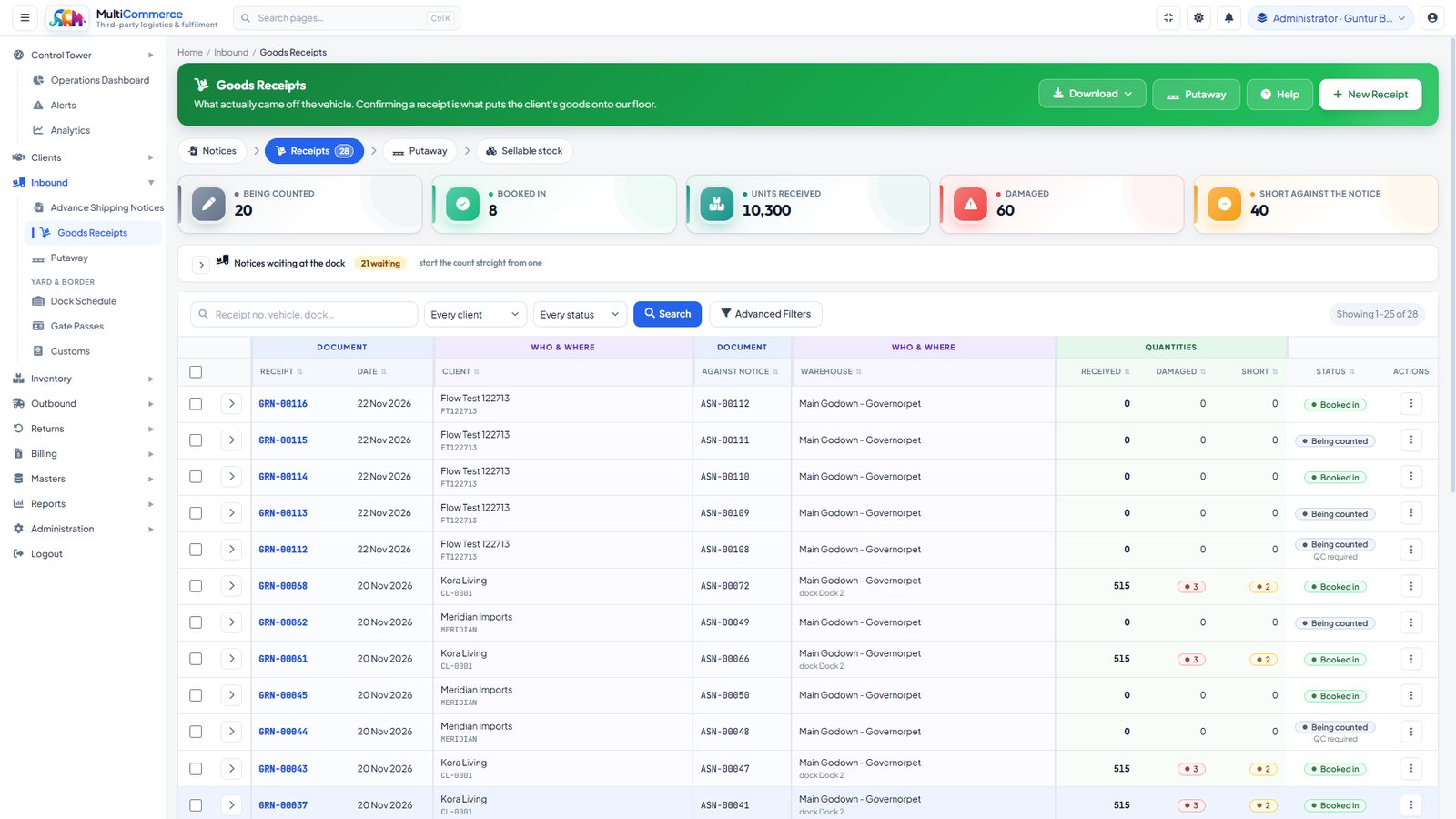
Goods Receipts — What actually came off the vehicle, against the notice. Received, damaged and short quantities are recorded at the dock, an
Goods ReceiptsWhat actually came off the vehicle, against the notice. Received, damaged and short quantities are recorded at the dock, and notices still waiting for a count are listed above the receipts.
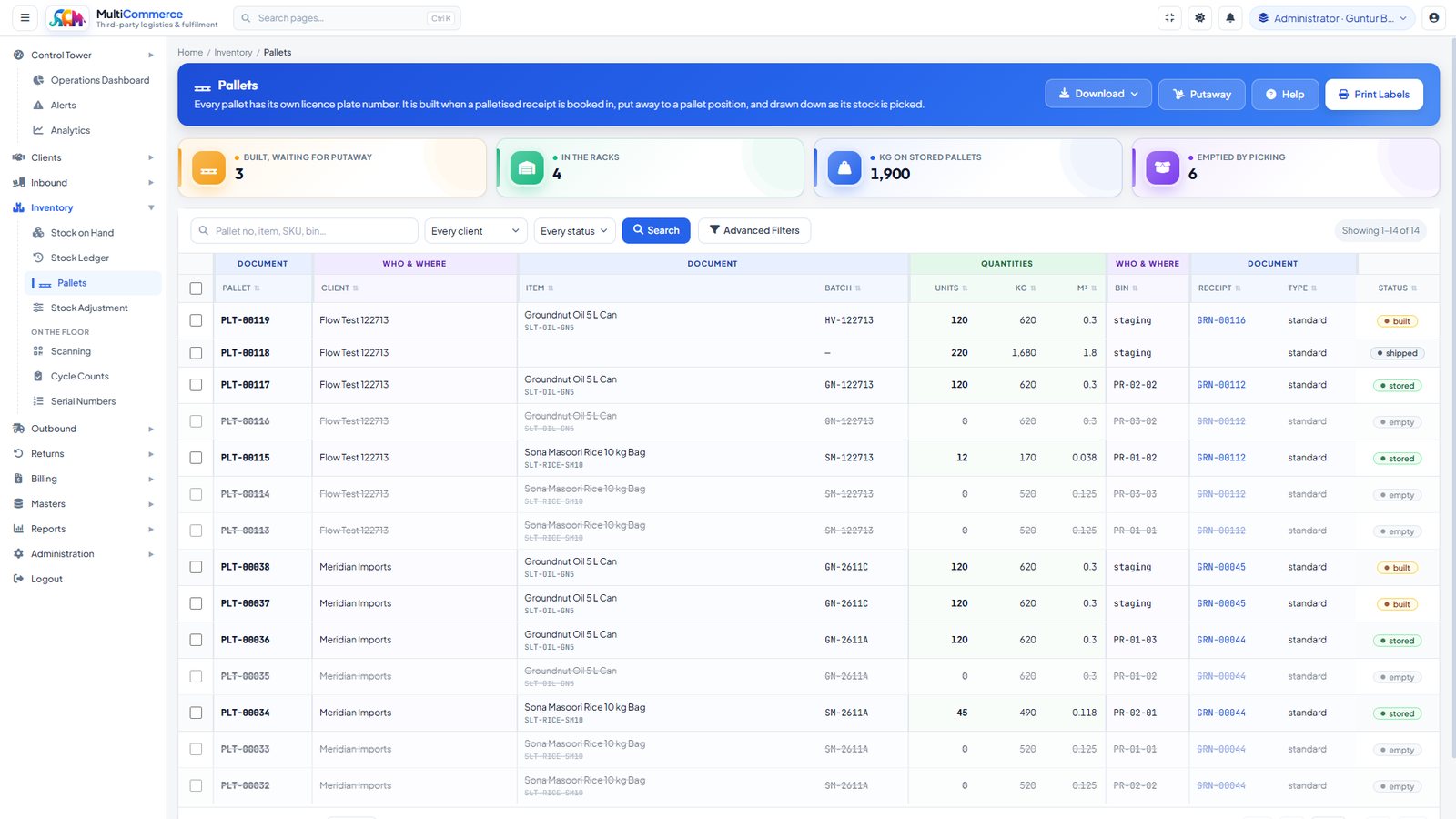
Pallets — Every pallet has its own licence plate number — built when a palletised receipt is booked in, put away to a pallet position, and d
PalletsEvery pallet has its own licence plate number — built when a palletised receipt is booked in, put away to a pallet position, and drawn down as its stock is picked.
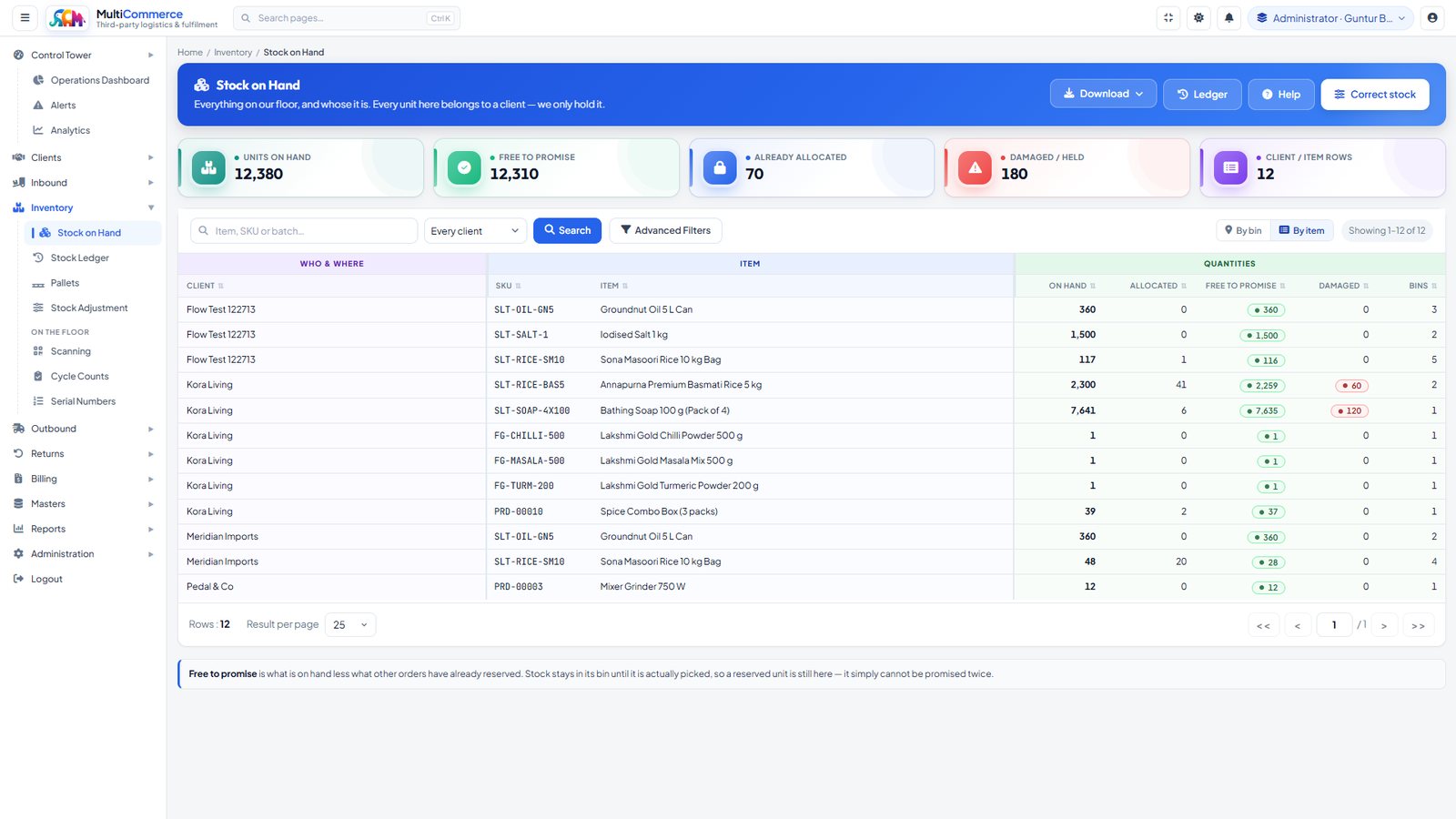
Stock on Hand — Everything on the floor and whose it is — on hand, allocated, free to promise and damaged, per client and item, by bin or by
Stock on HandEverything on the floor and whose it is — on hand, allocated, free to promise and damaged, per client and item, by bin or by item. Every unit belongs to a client; the warehouse only holds it.
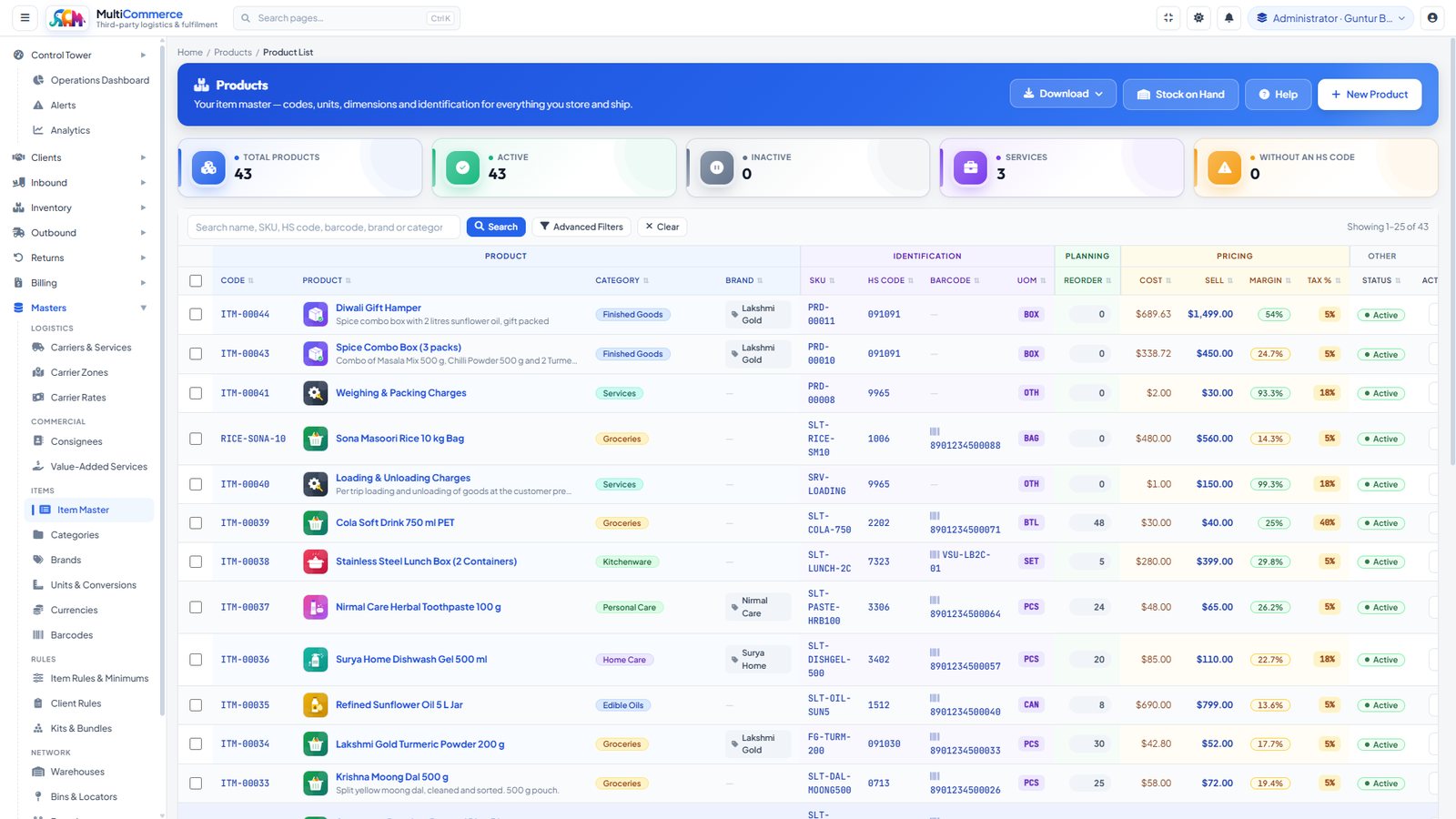
Item Master — Codes, HS codes, barcodes, units, reorder levels and pricing for everything stored and shipped, with the billable services kep
Item MasterCodes, HS codes, barcodes, units, reorder levels and pricing for everything stored and shipped, with the billable services kept in the same master as the goods.
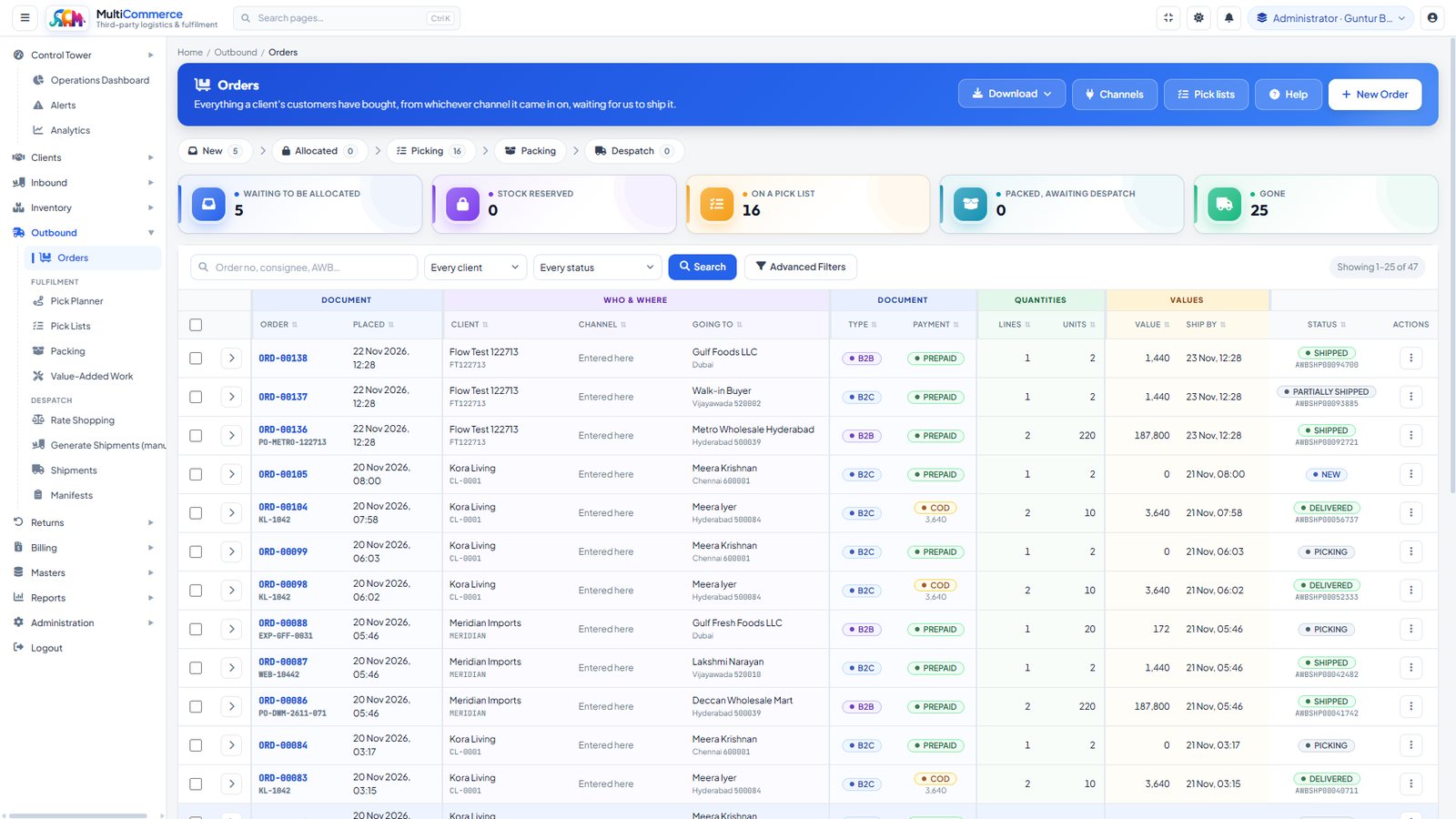
Orders — Everything a client’s customers have bought, from whichever channel it arrived on — B2B and B2C, prepaid and cash on delivery — gro
OrdersEverything a client’s customers have bought, from whichever channel it arrived on — B2B and B2C, prepaid and cash on delivery — grouped by stage: waiting to be allocated, on a pick list, packed, gone.
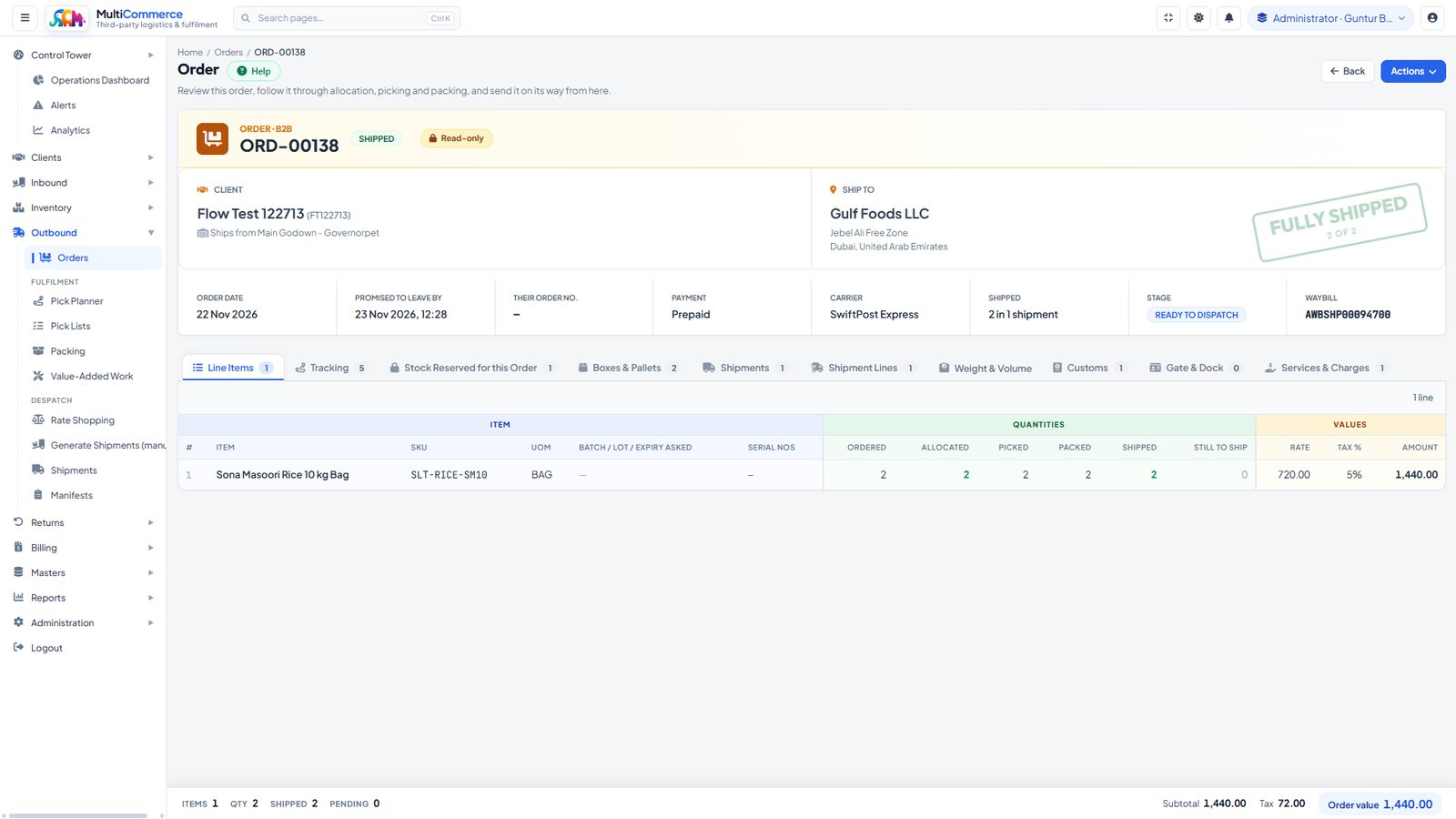
Order, End to End — One order followed through — ordered, allocated, picked, packed and shipped per line — with tabs for tracking, reserved
Order, End to EndOne order followed through — ordered, allocated, picked, packed and shipped per line — with tabs for tracking, reserved stock, boxes and pallets, shipment lines, customs, gate and dock, and the charges it raised.
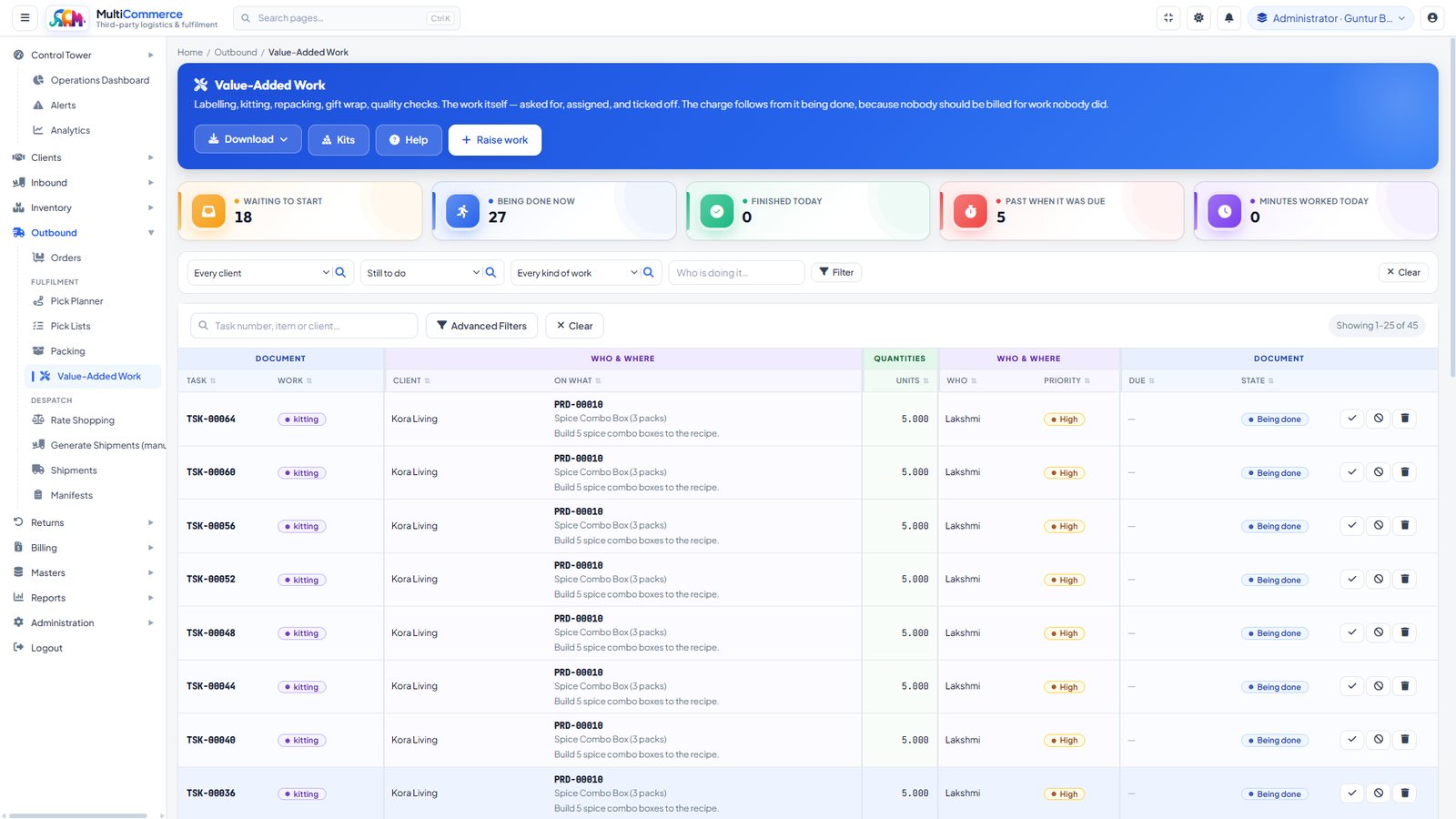
Value-Added Work — Labelling, kitting, repacking, gift wrap and quality checks — asked for, assigned and ticked off. The charge follows from
Value-Added WorkLabelling, kitting, repacking, gift wrap and quality checks — asked for, assigned and ticked off. The charge follows from the work being done, so nobody is billed for work nobody did.
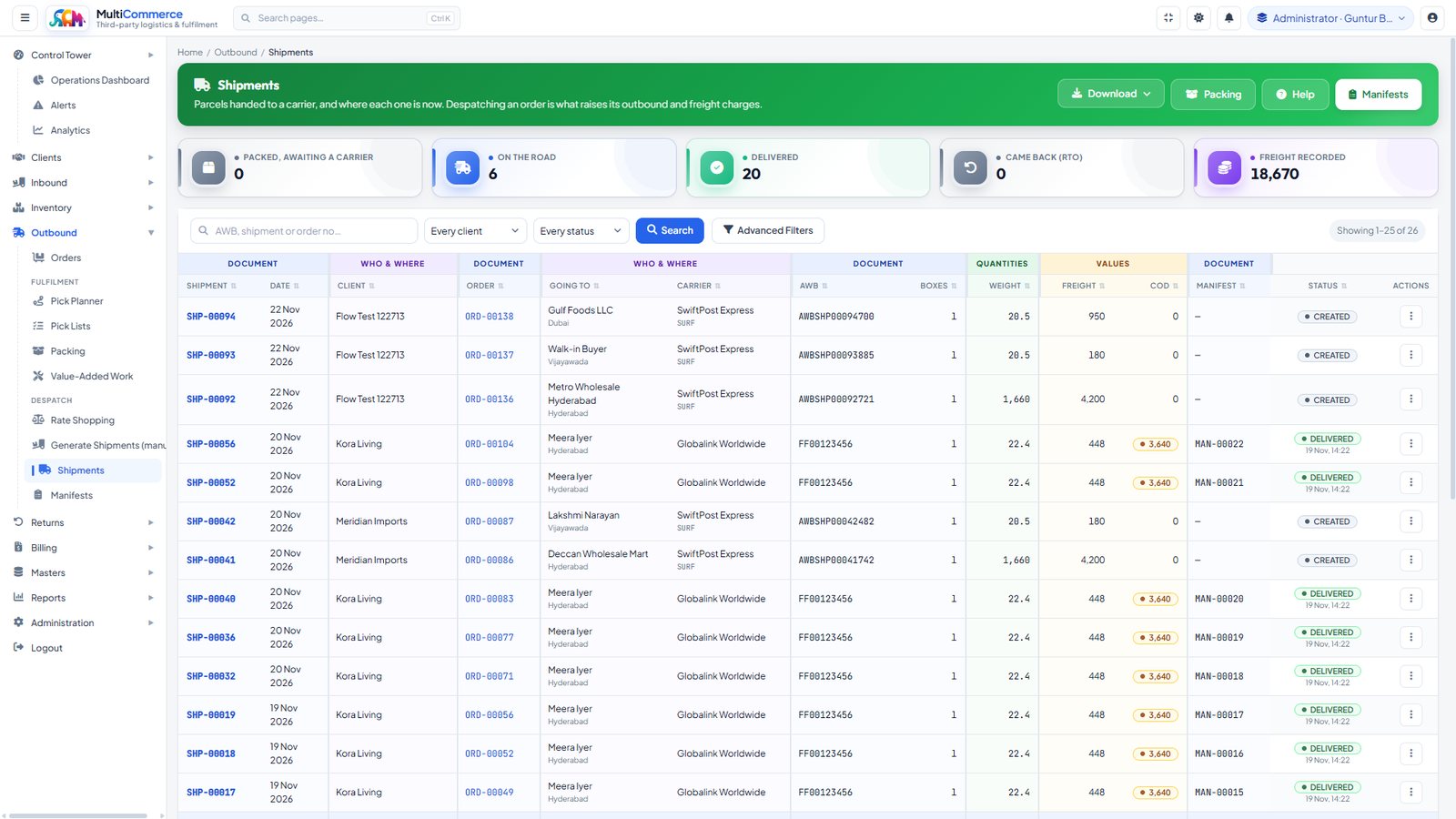
Shipments — Parcels handed to a carrier and where each one is now — waybill, boxes, weight, freight, cash on delivery and the manifest it le
ShipmentsParcels handed to a carrier and where each one is now — waybill, boxes, weight, freight, cash on delivery and the manifest it left on. Despatching an order is what raises its outbound and freight charges.
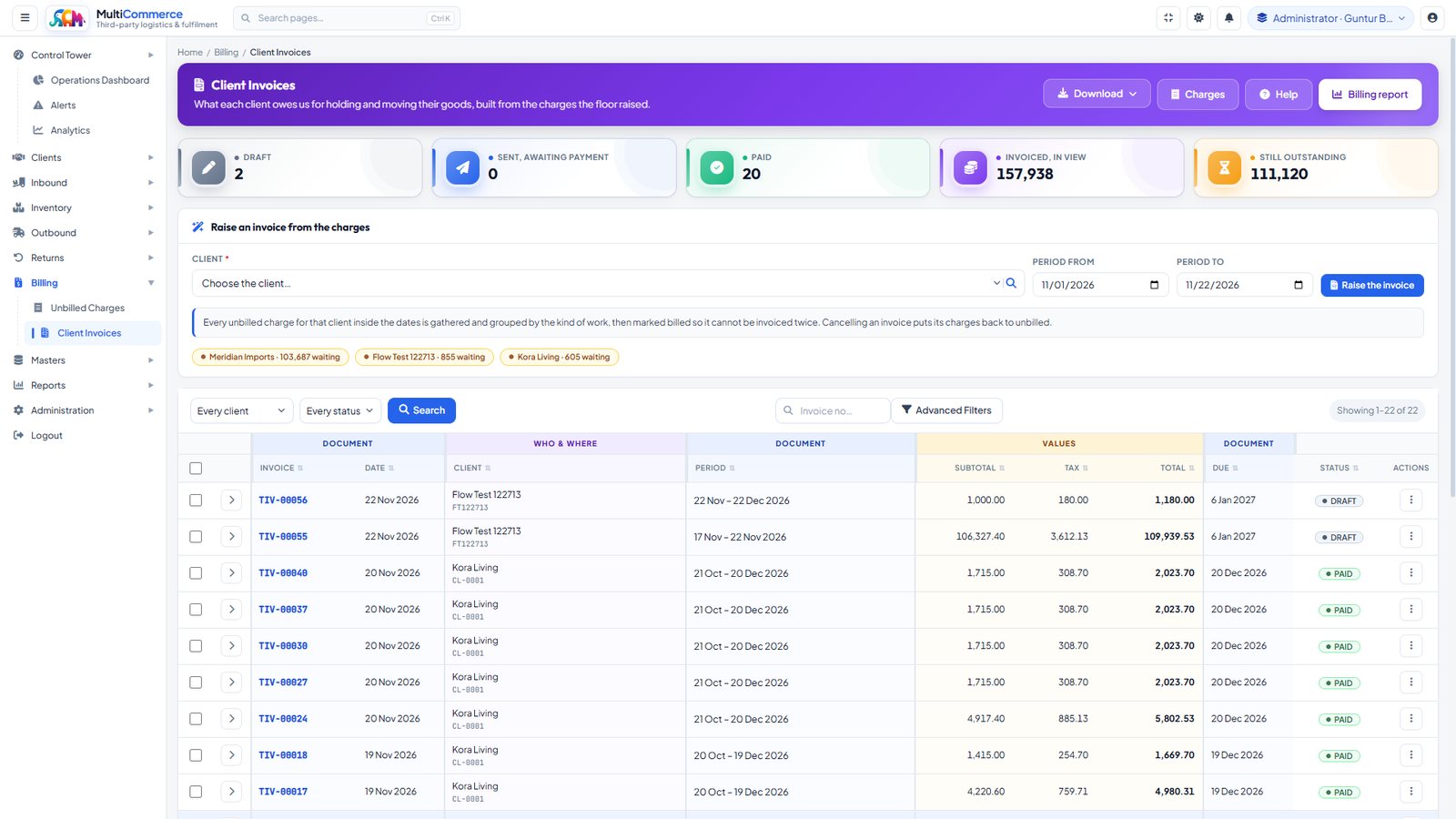
Client Invoices — Built from the charges the floor raised, gathered by period and grouped by kind of work, then marked billed so they cannot
Client InvoicesBuilt from the charges the floor raised, gathered by period and grouped by kind of work, then marked billed so they cannot be invoiced twice. Cancelling an invoice puts its charges back to unbilled.
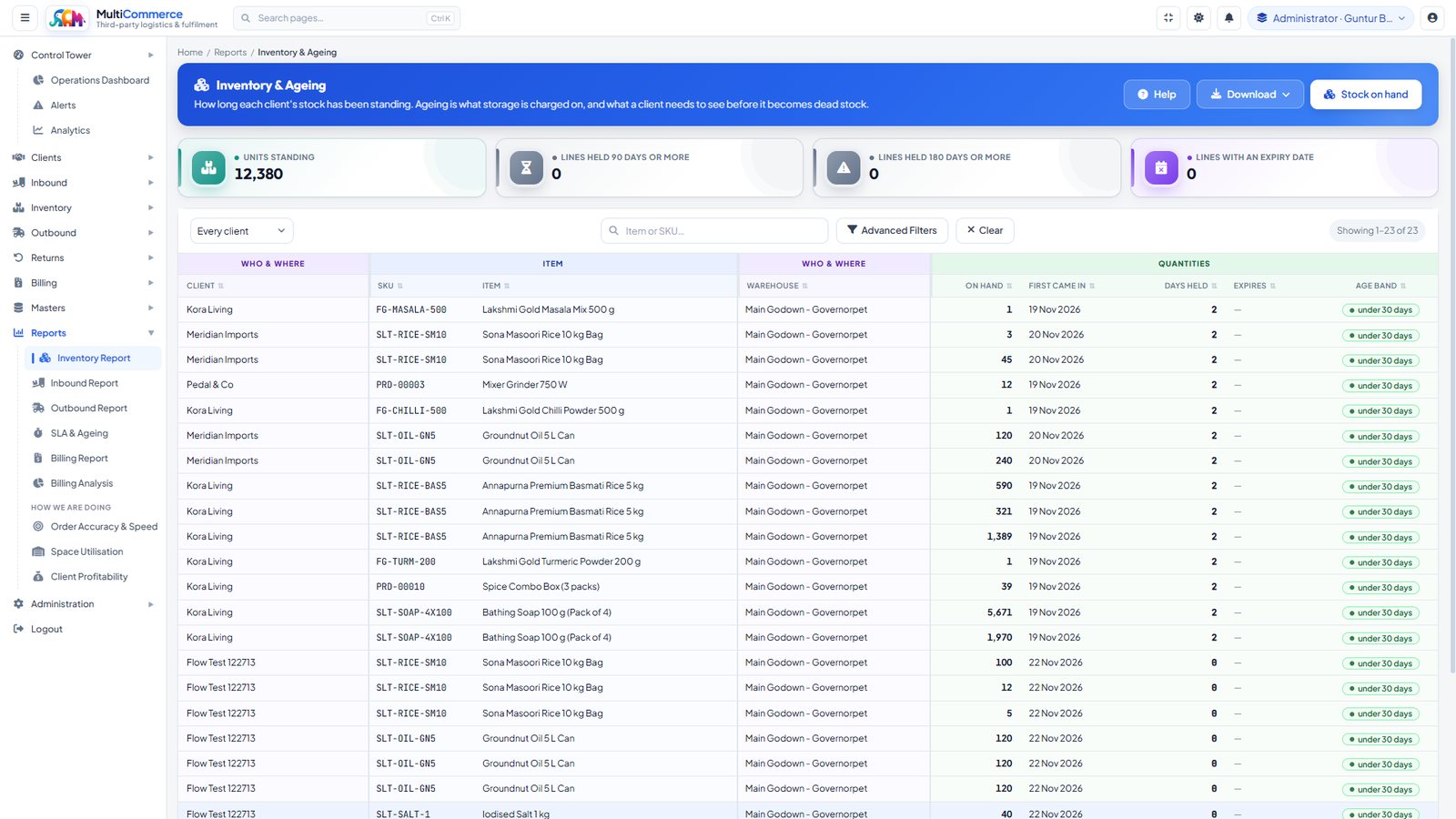
Inventory & Ageing — How long each client’s stock has been standing — days held, expiry and age band. Ageing is what storage is charged on,
Inventory & AgeingHow long each client’s stock has been standing — days held, expiry and age band. Ageing is what storage is charged on, and what a client needs to see before stock goes dead.
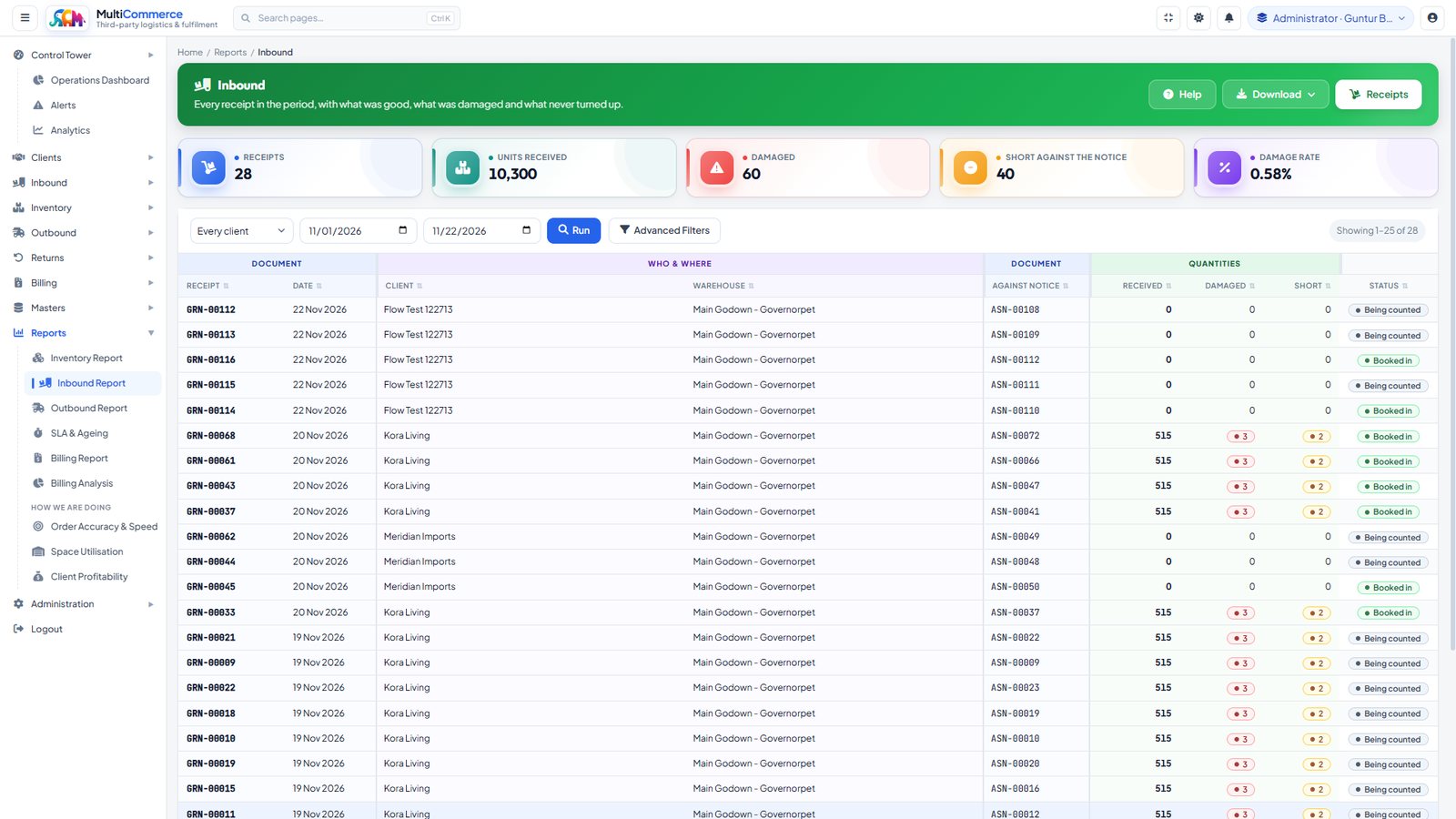
Inbound Report — Every receipt in the period — what was good, what was damaged and what never turned up — with the damage rate across all of
Inbound ReportEvery receipt in the period — what was good, what was damaged and what never turned up — with the damage rate across all of it.
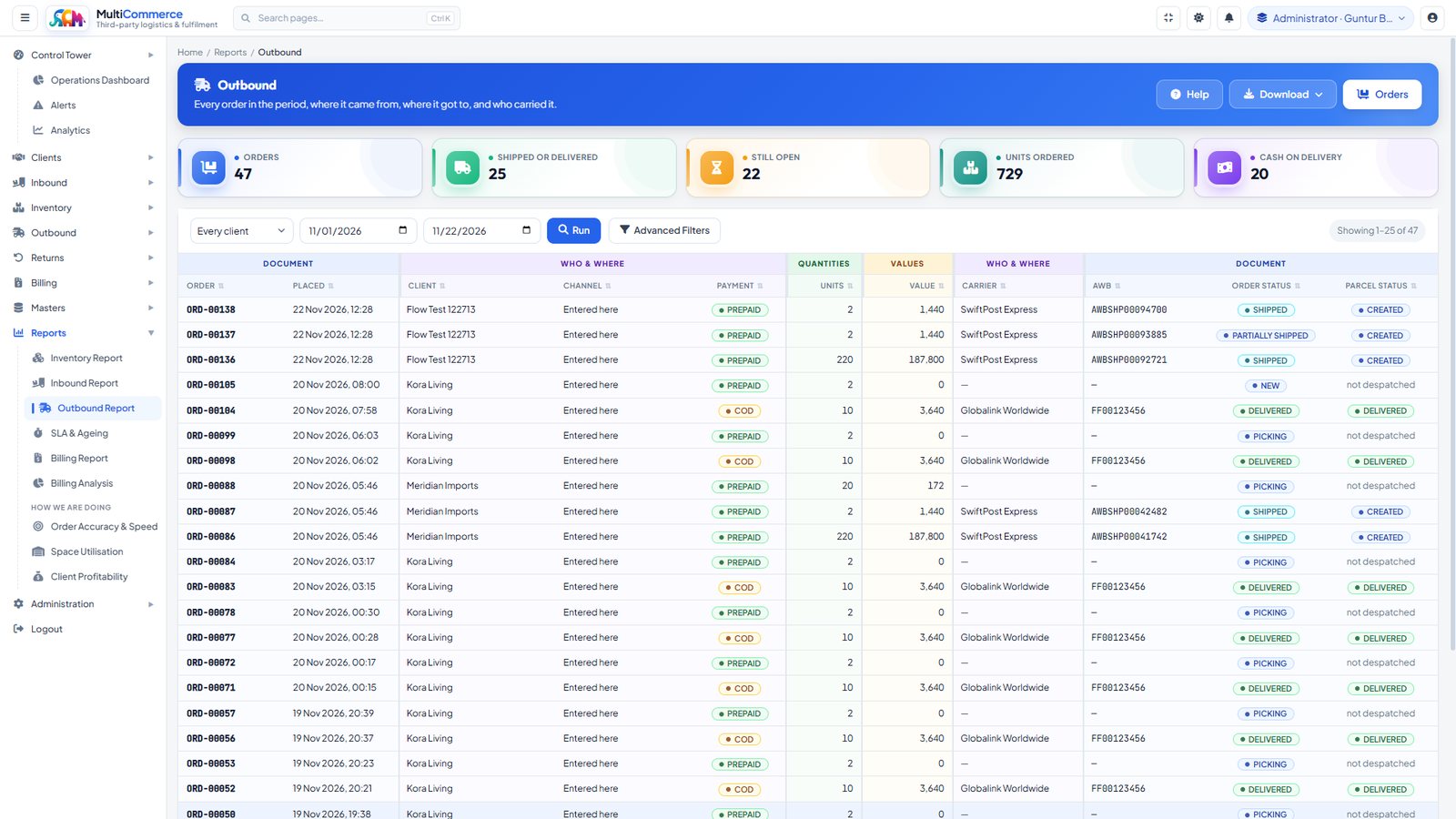
Outbound Report — Every order in the period: where it came from, where it got to and who carried it, with units, value and cash on delivery.
Outbound ReportEvery order in the period: where it came from, where it got to and who carried it, with units, value and cash on delivery.
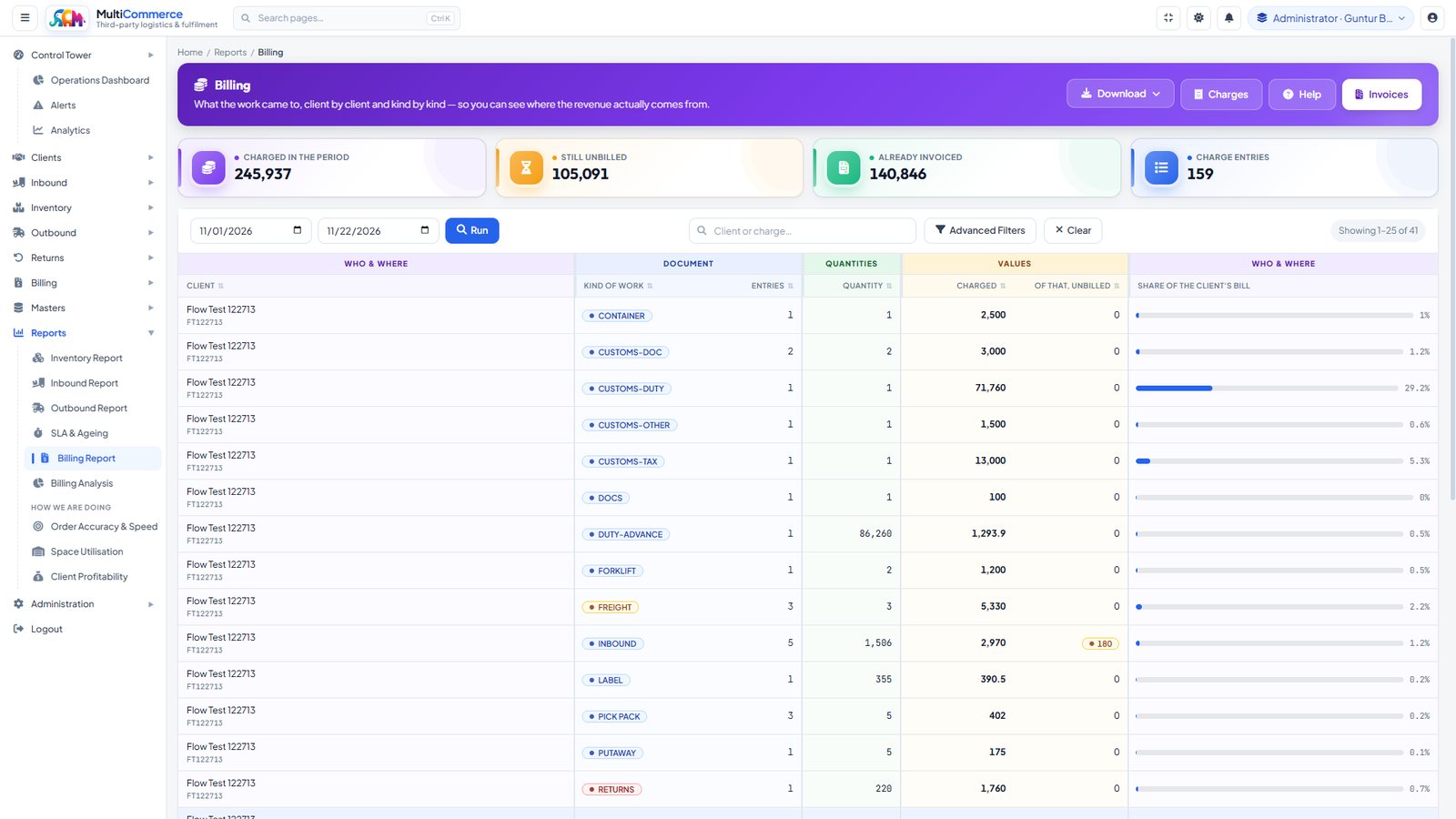
Billing Report — What the work came to, client by client and kind by kind — charged, already invoiced and still unbilled — so you can see wh
Billing ReportWhat the work came to, client by client and kind by kind — charged, already invoiced and still unbilled — so you can see where the revenue actually comes from.
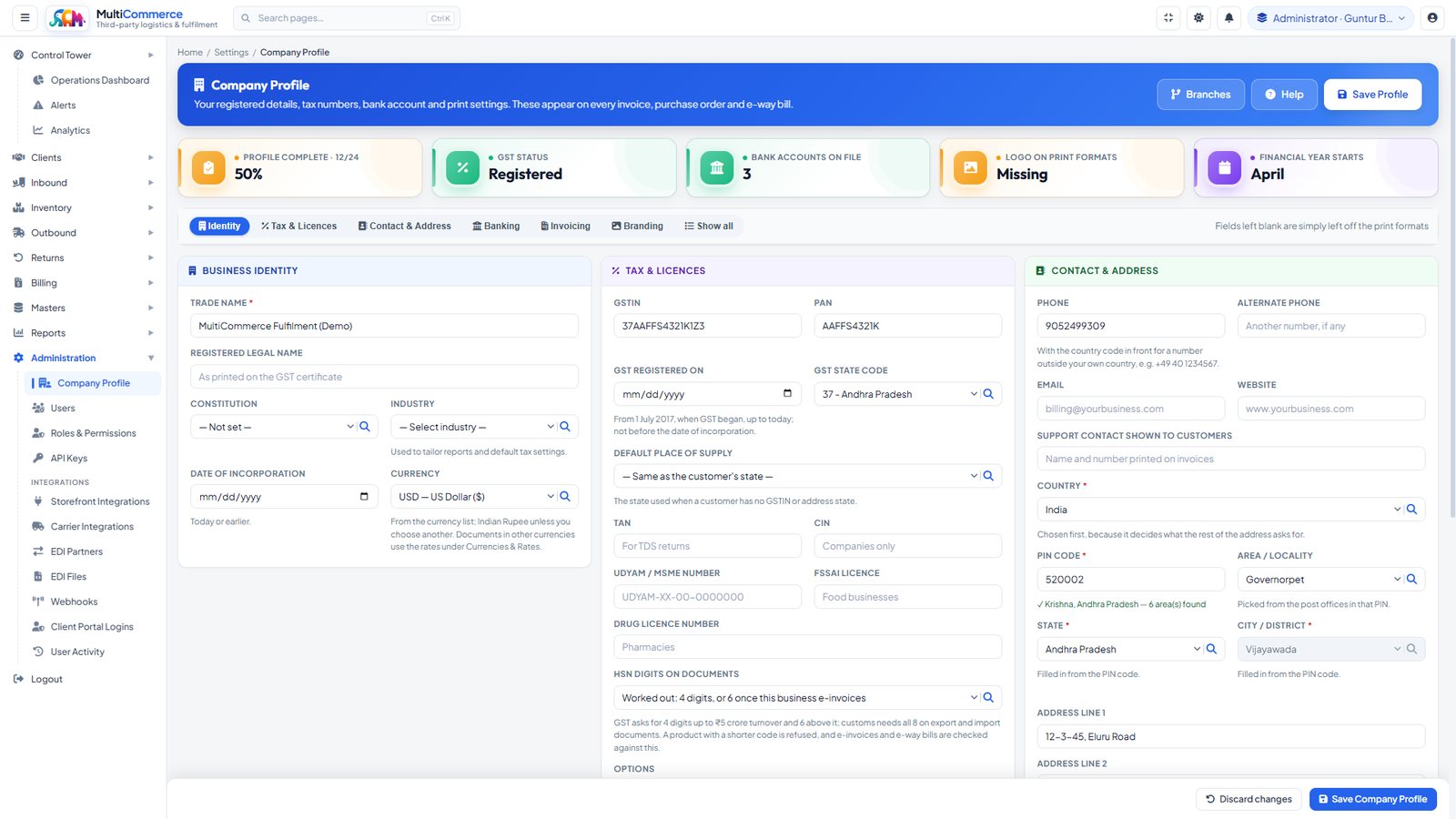
Company Profile — Registered details, tax numbers, bank accounts and print settings that appear on every invoice and e-way bill, with the ad
Company ProfileRegistered details, tax numbers, bank accounts and print settings that appear on every invoice and e-way bill, with the address form following the country chosen.
Module Coverage

Every module inside MultiCommerce 3PL

MultiCommerce 3PL is one integrated third party logistics software application rather than a warehouse tool with a billing tool beside it. Every module below reads the same client, item and contract masters, writes to the same stock ledger, and raises its charges against the same rate card — so the quantity a picker confirms is the quantity that reaches the invoice, and the order fulfillment software and the billing are not two systems to reconcile.

Control Tower 6 modules

Control Tower

The landing screen: the whole operation on one page — what is due in, what is allocated but not picked, what is packed and waiting for a vehicle, and what is late. Every stage is clickable through to the documents behind it.

Alerts

Raising, acknowledging and clearing what is wrong — stock below a client’s minimum, an order past its ship-by hour, a receipt not put away, a declaration not cleared. The alert records the telling, not the condition, so an acknowledgement is auditable.

Order Accuracy

Perfect-order measurement: complete, on time and not returned through your fault. All three must hold, which is why this reads lower and more honestly than a fill rate.

Fulfillment Speed

Order-to-pick, pick-to-pack and pack-to-despatch measured separately, because a release problem, a floor problem and a carrier collection problem need three different fixes.

Space Utilisation

By zone, by client and bin by bin, in volume, weight and unit count. A bin with no stated capacity shows usage and no percentage rather than a made-up one.

Client Profitability

Revenue against a cost model of labour rates, rent per cubic metre, packaging and standard minutes per task — converted into one currency before any total is formed, and shown as unknown until the model is filled in.

Inbound 6 modules

Advance Shipping Notices

A client tells you a load is coming. The notice records the expectation only — no stock moves — and is what makes scan-based receiving and planned cross-docking possible.

Goods Receipts

The vehicle arrives and what actually came is recorded against the notice or the purchase reference. Stock lands in staging and the inbound handling charge is raised at that moment.

Putaway

Stock moves from staging into a bin and becomes sellable. Auto-Allocate Bins proposes a location per line — same item and batch first, then an empty bin, by walking sequence — respecting storage class, weight, volume and pallet capacity, and never mixing clients.

Dock Schedule

Dock doors per warehouse with bookings by day, no overlaps, and an inbound-only door never offered for despatch.

Gate Passes

One pass per vehicle, in or out, raised from a notice, order or manifest with its load filled in. Logging in marks the notice arrived; a despatch vehicle cannot be logged out until its goods are shipped.

Customs

Import, export, into-bond, ex-bond and transhipment declarations with HS codes, values and duty per line. Anything flagged for customs cannot be received or despatched until cleared, and duty advanced on a client’s behalf is billed back at cost with the contract’s advance fee.

Inventory 8 modules

Stock on Hand

Live balances by client, item, warehouse, bin and batch, with free-to-promise shown as on hand less allocated. Stock stays physically in its bin until picked, so a reservation never hides a unit.

Stock Ledger

Every movement, written and never edited. A correction is a new entry carrying its reason, which is what a queried count is settled with.

Stock Adjustment

Write-ons and write-offs with a reason code and the attributes the item carries — batch, serial, lot, expiry. A deduction larger than the balance is refused before anything is written.

Cycle Counts

Blind by default, posted through the ordinary ledger so a variance is a movement with a reason rather than a silent overwrite. A line nobody counted stays uncounted; an empty box is not a zero.

Pallets

Every pallet’s licence plate, contents, weight, bin and status, with printable 100×150 mm labels. Pallets draw down as their stock is picked.

Serial Numbers

One row per physical unit, tracked from receipt to the consignee it shipped to, with statuses that include lost and kitted.

Scanning

Every read kept, accepted or refused. The scanner resolves an item, a bin, a pallet, a serial or a document from one code rather than asking which it is.

Barcodes

The codes each item answers to — EAN, UPC, a client’s own, a case code — so a scan matches whatever is physically printed on the carton that arrived.

Outbound & Order Fulfillment 9 modules

Orders

B2C parcels, B2B cases and pallets, and transfers, each with its SLA ship-by hour. Orders arrive from a channel, the portal or keyed in, and a contract can price each type differently.

Allocation

Reservations against free stock, FEFO then FIFO, so expiry-dated goods leave in the right order and nothing is promised twice.

Pick Planner

The seven picking strategies — single, batch, zone, wave, cluster, pallet and case. The planner proposes and the operator releases; nothing is written until a sheet is ticked.

Pick Lists

Walked in pick-sequence order, which makes a sheet a route rather than a scavenger hunt. A blank line is not picked in full, so a part-done sheet stays open to finish. Sheets are never mixed across clients.

Packing

The package with its real and volumetric weight, which is what the carrier will actually bill on — quoting on actual weight alone is how an operator loses money on light bulky goods.

Shipments

The carrier booking and the waybill. When a booking fails the shipment keeps no number and is marked not booked, because an invented number is worthless on a parcel and reconciles against nothing.

Manifests

The day’s handover to each carrier, with the shipments on it and the paperwork the driver signs.

Rate Shopping

Every carrier quote recorded with the one taken marked, worked from your own zones and rate bands, with a live quote API as a cross-check where the carrier offers one.

Value-Added Work

Labelling, kitting, repacking, QC, shrink-wrap, unloading, forklift time and detention. The task is recorded, then priced into an unbilled charge when it is done.

Returns & Kitting 2 modules

Returns

Booked against the original despatch, graded and dispositioned — good stock back on the shelf, damaged held aside, and the returns handling charge raised per unit.

Kits

Assembling and breaking kits as a stock movement rather than a note, with the kit instance recorded on the task so what was consumed and what was produced both reach the ledger.

Billing 6 modules

Rate Cards & Contracts

The contract is the rate card: number, billing cycle, payment days, minimum monthly bill, a yearly increase that applies itself on each anniversary, and seven service levels with the credit and cap for each.

Conditional Rates

A line can apply only to a container type, vehicle type, B2B or B2C, palletised or loose, a temperature class, one warehouse or a quantity slab. The most specific match prices the work.

Charges

Every billable event as it happens, recording where its price came from — contract, catalogue, typed, or passed through at cost — and which condition chose it.

Storage Runs

Charged daily on what is actually in the racks rather than on what was received, honouring the contract’s free days and saying so on the charge.

Client Invoices

One invoice from the period’s charges, less SLA credits, topped up to the contract minimum, with the due date taken from the contract. A breach is credited once; days an earlier invoice covered are excluded.

Billing Analysis

Revenue by client and service, contract against catalogue, SLA promised against kept, unbilled ageing, vehicles and containers, a twelve-month trend — and work done but never charged, which is usually the fastest money an operator finds.

Masters 9 modules

Clients

Each brand whose goods you hold, with their storage mode — palletised, loose or mixed — billing currency, tax number and the contracts that price their work.

Consignees

Each client’s own ship-to list: trade buyers with tax number, delivery hours, appointment and pallet rules and credit hold, plus repeat shoppers. A consignee on hold, or belonging to another client, is refused.

Value-Added Services

The catalogue of extra work and its prices. A service can also be set to charge itself when a receipt is booked, a putaway finishes, an order ships, a return is booked, a vehicle leaves or customs clears.

Item Rules

Units per case, cases per layer, layers per pallet, pallet type, stacking, storage class and always-quality-check — as a general rule, a rule for one client, or a rule for one client in one warehouse.

Client Rules

Each client’s house rules on top of the item master, so one brand’s handling requirements do not become everybody’s.

Carrier Zones & Rates

Your own zone map and rate bands, which is what rate shopping actually works from rather than depending on every carrier offering a quote API.

Carriers

Each carrier, its services and its status vocabulary mapped to yours — with a house default and a per-carrier override, so a new carrier is data entry rather than a release.

Units of Measure

Any code you use — EA, CTN, PAL, KG — with conversions, and an item rule that beats the general one.

Currencies

Clients billed in their own currency, with the operator’s rates entered by hand and dated, so a profitability total is never assembled from two currencies.

Integrations 5 modules

Storefront Integrations

Shopify and WooCommerce spoken natively, anything else through a generic adapter configured on the channel. Credentials, API version and per-platform settings with a Test that proves them before an overnight run does.

Channel Sync & Logs

Webhook, scheduled pull or pasted payload, all landing in the same orders table. Unknown SKUs are matched and the mapping remembered, the same payload twice does not create the order twice, and a despatch is reported back once.

Carrier API

Quote, book, track and cancel behind one interface, with the call log. A manual carrier whose driver brings pre-printed waybills is a first-class option, not a gap.

EDI

850, 856, 945 and 846 in and out, in X12 and EDIFACT, with the message store and downloads for anything a trading partner queries.

Webhooks

Signed outbound events, queued and then sent, so a client’s own system learns about a receipt or a despatch without polling you.

Reports 6 modules

Inbound Report

Receipts, putaway and dock-to-stock time by client, warehouse and period.

Outbound Report

Orders, picks, packs and despatches, with the order fulfillment cycle broken into its stages.

Inventory Report

Balances, movements, ageing and variance by client, with the attributes the item carries.

Billing Report

Charges raised, invoiced and outstanding, by client and by service code.

SLA Report

Each contract’s promises against what was actually achieved, with the breaches and the credits they produced.

Billing Analysis

The commercial view: contract against catalogue pricing, unbilled ageing, and work done but never charged.

Client Portal 9 modules

Portal Home

What the client sees when they sign in: their position at a glance, with everything below one click away.

Their Stock

Balances by item, batch and expiry, filtered to that client by the session rather than by the request.

Their Orders

Every order and the stage it has reached, with the despatch and tracking against it.

Order Entry

Raising an order themselves, checked against free stock before acceptance — the refusal gives the figure that actually is available.

Their Shipments

Shipments with carrier, waybill and tracking, so the client answers their own customer without telephoning you.

Their Inbound

What they have told you is coming, and what has arrived against it.

Their Returns

Returns booked, graded and dispositioned, with what went back to sellable stock.

Their Invoices

Each invoice opening into the charges behind it, which is what turns a billing query into a self-service answer.

Their Scorecard

Their own service levels against the contract — the same figures you see, which is the point.

Administration 5 modules

Users & Roles

Logins created by an administrator, with no public signup — in a warehouse, staff are added by whoever runs the floor. Password rules, lockout after five failures, and identical messages for a wrong username and a wrong password.

Client Portal Logins

A portal user is an ordinary platform user with a client attached, inheriting the password rules, lockout, sessions and audit trail. Ordering and inbound booking are switches turned on per client.

Company, Branches & Warehouses

The operator’s own structure, opening with the country: an Indian PIN fills in state and city, every other country gets a postal code as that country writes it.

Bins & Locators

Every position with its kind, storage class and capacity in weight, volume, units and pallets — which is what makes an automatic putaway refusal explainable.

Activity Log

Who did what and when, across the whole application, kept rather than rotated away.

Billing

What gets charged, and the moment it is captured

A charge is raised by the event, not by somebody remembering to write it down. Where a client’s rate card does not price a kind of work, nothing is invented — the message says so rather than reporting the work as billed.

Contracts

The contract is the rate card

Everything the floor does is priced from the card in force on that day. Change the card and you change the billing, with no code and no spreadsheet beside it.

Terms that bill themselvesNumber, billing cycle, payment days, a minimum monthly bill and a yearly increase that applies itself on each anniversary and logs that it did.
Seven service levelsDespatch within, booked in within, dock-to-stock within and returns processed within, plus orders despatched complete, pick accuracy and inventory accuracy.
Credits that cannot be paid twiceEach level carries its own credit and cap. A breach is credited once, and days an earlier invoice already covered are excluded automatically.
Conditional and slab ratesA line can apply to one container type, vehicle type, temperature class, warehouse, B2B or B2C, or a quantity slab. The most specific match wins.
Priced in the client’s currencyEvery client is invoiced in their own currency, while the cost model behind profitability stays in yours and converts before any total is formed.
Every charge says where its price came fromContract, catalogue, typed by hand, or passed through at cost — and which condition chose it. That is what makes an invoice defensible.
Picking

Picking, seven ways

Warehouses genuinely differ and the wrong strategy costs a shift, so the Pick Planner proposes and the operator releases. Nothing is written until a sheet is ticked.

Most warehouses start here

Batch

Several orders on one sheet, sorted after picking. The usual choice.

Single

One order per sheet, where an order must not be mixed with another.

Zone

One aisle per sheet, the order assembled from several. Fastest in a long building.

Wave

Everything due by a cut-off, released together so despatch has one deadline.

Cluster

A trolley of orders, a tote each. Picked once, with no sorting afterwards.

Pallet

Full-pallet lines only, from bulk. Keeps forklifts out of the pick faces.

Case

Whole cases only — a different walk from singles, usually a different person.

Guard rails

Rules the system refuses to break

Each of these is a mistake a third party logistics operator can only afford to make once, so none of them is left to a procedure document. They are enforced in the code.

Enforced, not documented
6 guard rails

Every unit belongs to a client

Stock is keyed by client, item, warehouse, bin and batch. There is no such thing as unowned stock, and sheets never mix clients.

The ledger is written, never edited

A correction is a new entry carrying its reason. You also cannot take from a bin what is not in it — an over-deduction is refused, not silently clamped.

A waybill is the carrier’s or it is nothing

A failed booking leaves the shipment with no number, marked not booked. An invented number looks fine on screen and reconciles against nothing.

A delivered parcel is never un-delivered

A late scan cannot move a signed-for parcel back to in transit. The signature happened, and reopening it would make the service figures lie.

A blank line is not a zero

An uncounted count line is not posted, and a blank pick line is not picked in full. An empty box meaning “none” would write off real stock.

Nothing says it was charged when it was not

If a rate card does not price a kind of work, no charge is invented and the message says so. A despatch is reported to the storefront exactly once.

Integrations

Integrations are the product, not an add-on

A third party logistics operator is only as good as the systems it plugs into. Each connector below is configuration on a record rather than a release — and each was written around the specific way its platform misbehaves.

Shopify

Authenticates withX-Shopify-Access-Token header; the old key-and-password-in-the-URL form no longer works. The dated API version is a setting, because it retires after about a year.

Cursor paging out of the Link header. A limit=250 call with no cursor reads the first 250 orders and silently ignores the rest, and nobody notices until a shopper telephones. Stock is set by inventory item and location, never by SKU, and a despatch is a fulfillment against a fulfillment order — which is what emails the shopper their tracking.

WooCommerce

Authenticates withConsumer key and secret, which travel in the request — so the store must be https, and nothing writes an unredacted URL to a log.

Its own status vocabulary (pending, processing, on-hold, completed), so which status to read and which to write are settings. There is no fulfillment object: despatch is the order moving to completed plus the tracking number written into the meta keys the common tracking plugins read.

Any other storefront

Authenticates withWhatever that platform uses, held as JSON on the channel record.

A bespoke Laravel or Odoo shop, CS-Cart, or a marketplace with an ordinary REST API runs on the generic adapter, with paths and field names configured. A new storefront is a form to fill in, not a release.

REST carriers

Authenticates withA token, a JSON POST to book and a GET to track, with paths and field names on the carrier record.

Covers the majority of modern carrier APIs. Each carrier’s own status words map to yours with a house default and a per-carrier override — an unmapped word leaves your status alone rather than guessing, because a wrong guess marks a parcel delivered and stops anybody chasing it.

First Flight

Authenticates withAccount credentials on the carrier record.

Returns failures inside an HTTP 200. Reading the status line as success puts unbooked parcels on a van, so the body decides. Its tracking splits date and time into two fields that have to be rejoined.

DPost

Authenticates withCredentials in the query string.

Every value is percent-encoded — a password containing # truncated the request in the older code — and every stored form is redacted.

Manual carriers

Authenticates withNone, deliberately.

A regional carrier whose driver arrives with a book of pre-printed waybills is most of the world. The clerk types the number and the shipment records honestly that no API was involved, rather than the system inventing one.

EDI

Authenticates withPer trading-partner configuration.

850, 856, 945 and 846 in and out, in both X12 and EDIFACT, with the message store and downloads for anything a partner queries.

Outbound webhooks

Authenticates withSigned events your client’s own system verifies.

Queued and then sent, so a client learns about a receipt or a despatch without polling you, and a slow endpoint on their side does not hold up your floor.

Orders arrive three ways and all land in the same table: a webhook posted as the order is placed, a scheduled pull against the store’s API, or a JSON payload pasted in for a marketplace not yet connected. An unknown SKU is matched and the mapping remembered. The same payload twice does not create the order twice. A push with no credentials saved is recorded as a dry run rather than reported as a success.

Operations

The parts most 3PL systems leave to paper

Dock schedule and gate passes

Dock doors per warehouse with bookings by day and no overlaps, and an inbound-only dock is not offered for despatch. One gate pass per vehicle, in or out, raised from a notice, order or manifest with its load filled in — and a despatch vehicle cannot be logged out until its goods are shipped.

Customs, including duty you advance

Import, export, into-bond, ex-bond and transhipment declarations with HS codes, values and duty per line. Anything marked as needing customs cannot be booked in or despatched until its declaration clears. Where you pay duty on the client’s behalf it is billed back at cost, once and untaxed, plus the contract’s advance fee.

Quality check and quarantine

Required by the receipt, the client’s rules or the item itself. Line by line: sampled, failed, checks ticked, remark. Failed units book into the quarantine bin, which is never promised to an order and never picked.

Automatic bin allocation

Same item and batch first, then an empty bin, by walking sequence — pallets to pallet positions, each item only into a bin of its own storage class, never staging, dock or quarantine, and never mixing clients. A bin chosen by hand that cannot take the weight, volume, units or pallets, or is the wrong store for a hazardous, high-value, chilled or frozen item, is refused with the reason.

Client portal

The client portal, end to end

Most of a 3PL’s inbound calls are clients asking questions the system already knows: where is my stock, did that order go, what is this charge.

They sign in and see their own stock by item, batch and expiry; every order and the stage it has reached; shipments with tracking; what is coming in; returns; invoices that open into the charges behind them; and their service scorecard against their contract — the same figures you see.

A portal user is an ordinary platform user with a client attached, so it inherits the password rules, lockout, sessions and audit trail rather than being a second, weaker way in. Queries filter by the client id taken from the session, never the request.

The client journey

What a client actually does

The whole relationship from their side, in the order it happens. Everything after the first step is self-service.

STEP 01

Register

You create their login and attach their client record. No public signup — in a warehouse, accounts are opened by whoever runs the floor.

STEP 02

Send material to our warehouse

They raise an advance shipping notice so you know what is coming, then the goods arrive, are checked and are put away into bins.

STEP 03

Connect their store

Shopify, WooCommerce or any REST storefront is connected with a Test that proves the credentials before an overnight run does.

STEP 04

Receive orders

Orders flow in by webhook, scheduled pull or the portal itself, each with its ship-by hour, allocated against free stock.

STEP 05

Ship to the consignee

Picked, packed, rate-shopped, booked with the carrier and despatched — with tracking written back to the storefront so the shopper is emailed once.

STEP 06

Track and settle

They watch every stage in the portal, and the period’s charges become one invoice they can open down to the movement that created each line.

  • Isolation enforced twice: session-derived client id on every query, plus an interceptor fencing portal logins
  • Invoices open into the charges behind them, turning a billing query into a self-service answer
  • Order entry and inbound booking are switches you turn on per client, not defaults
  • A client order is checked against free stock before acceptance, with the available figure given in the refusal
Inside the portal

What your client sees when they sign in

Eight screens from the client portal itself. A client sees their own stock, their own orders and their own movements and nothing from any other client — which is what turns “where is my order” from a phone call into something they answer themselves. Pick a screen from the list, or click the picture to open it full size.

Client Portal · Storage & Fulfillment
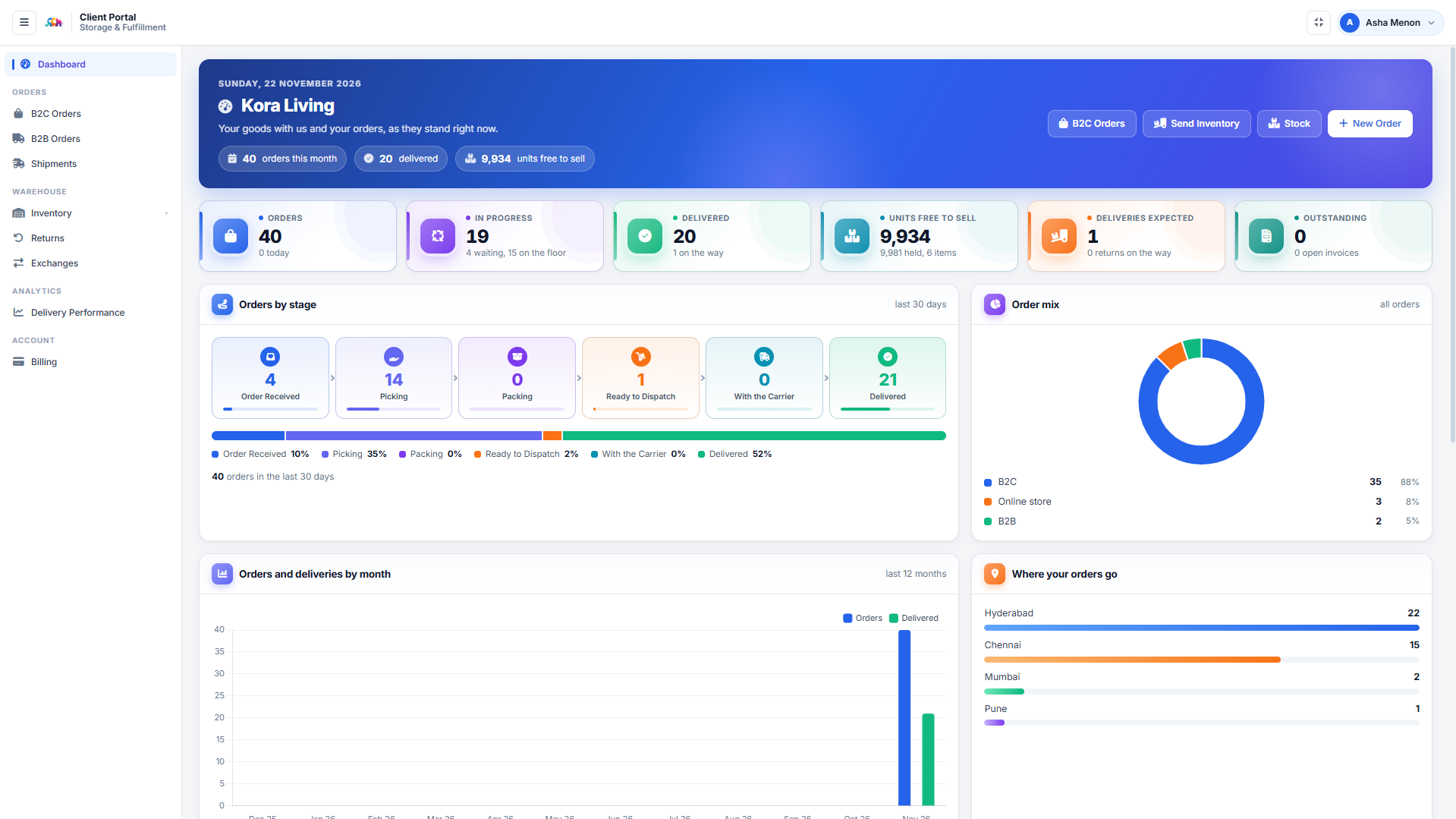
MultiCommerce 3PL client portal, dashboard screen: What a client sees first: orders this month, how many are in progress and how many delivered, units free to sell, deliveries expected and invoices
DashboardWhat a client sees first: orders this month, how many are in progress and how many delivered, units free to sell, deliveries expected and invoices outstanding. Below that, orders by stage from received to delivered, the split between B2C, online store and B2B, twelve months of orders against deliveries, and the cities their parcels actually go to.
Why they use it

Why clients sign in instead of ringing you

A client’s goods are in your building, not theirs — that is the whole problem the portal solves. Everything below is a question they would otherwise telephone you to ask, beside the screen that now answers it without you.

“Where is my stock?”Asked every morning

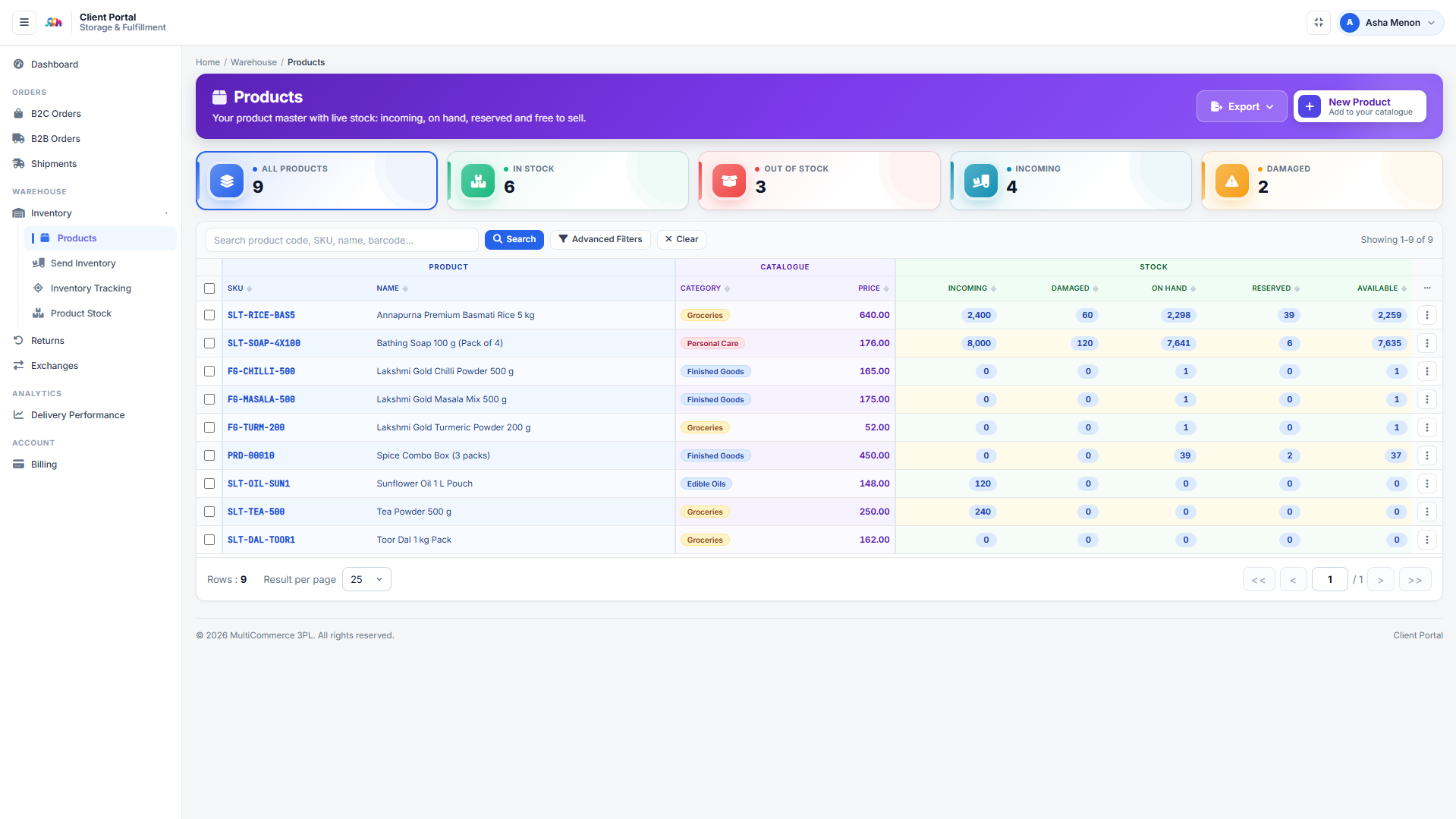
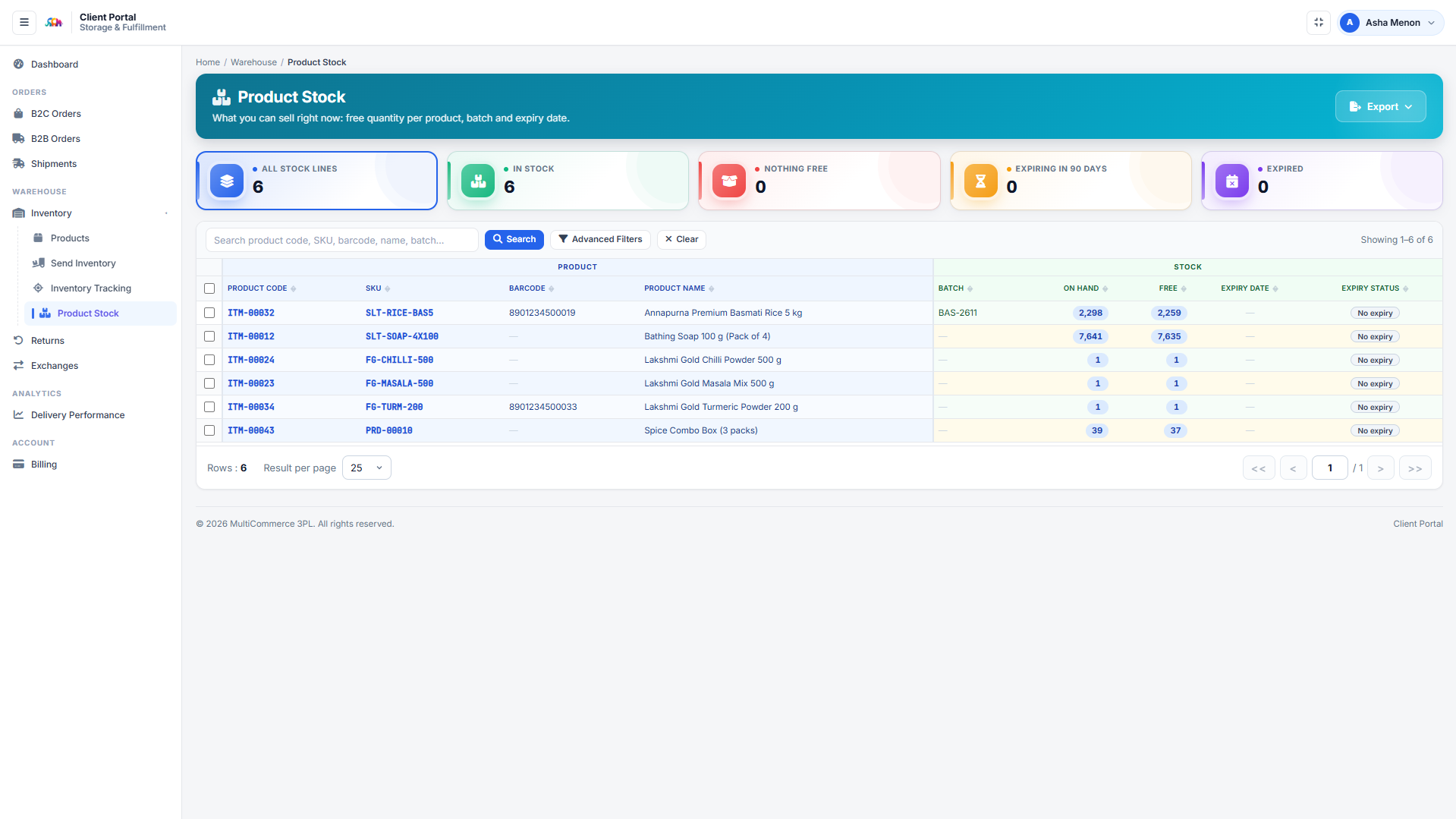
Free to sell per product, broken down by batch and expiry, with on hand beside free so stock that is merely reserved is visible rather than simply missing. It is the number they trade on, and it is the one they cannot work out for themselves.

Product stock
“Did my order go?”Asked all day

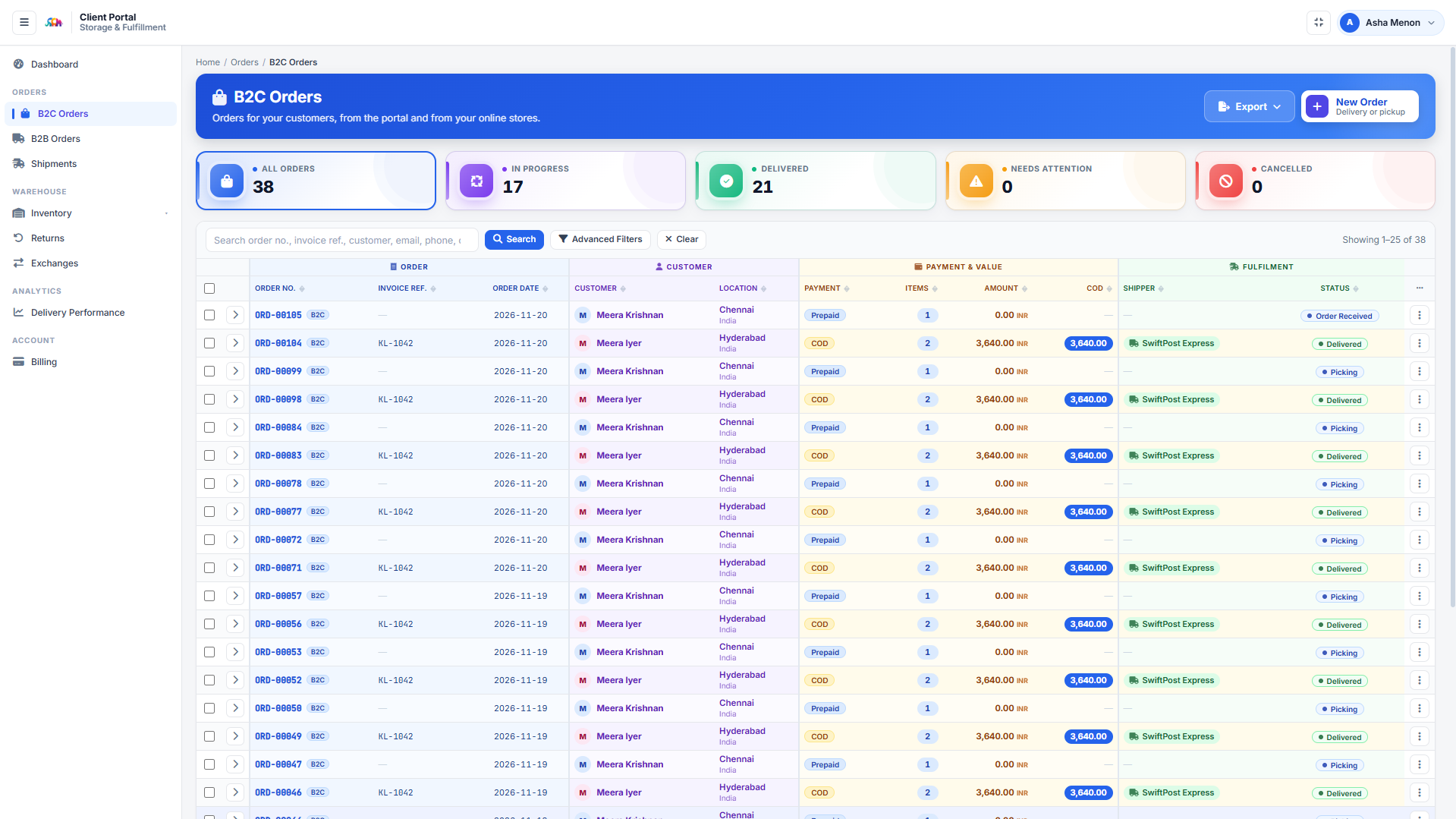
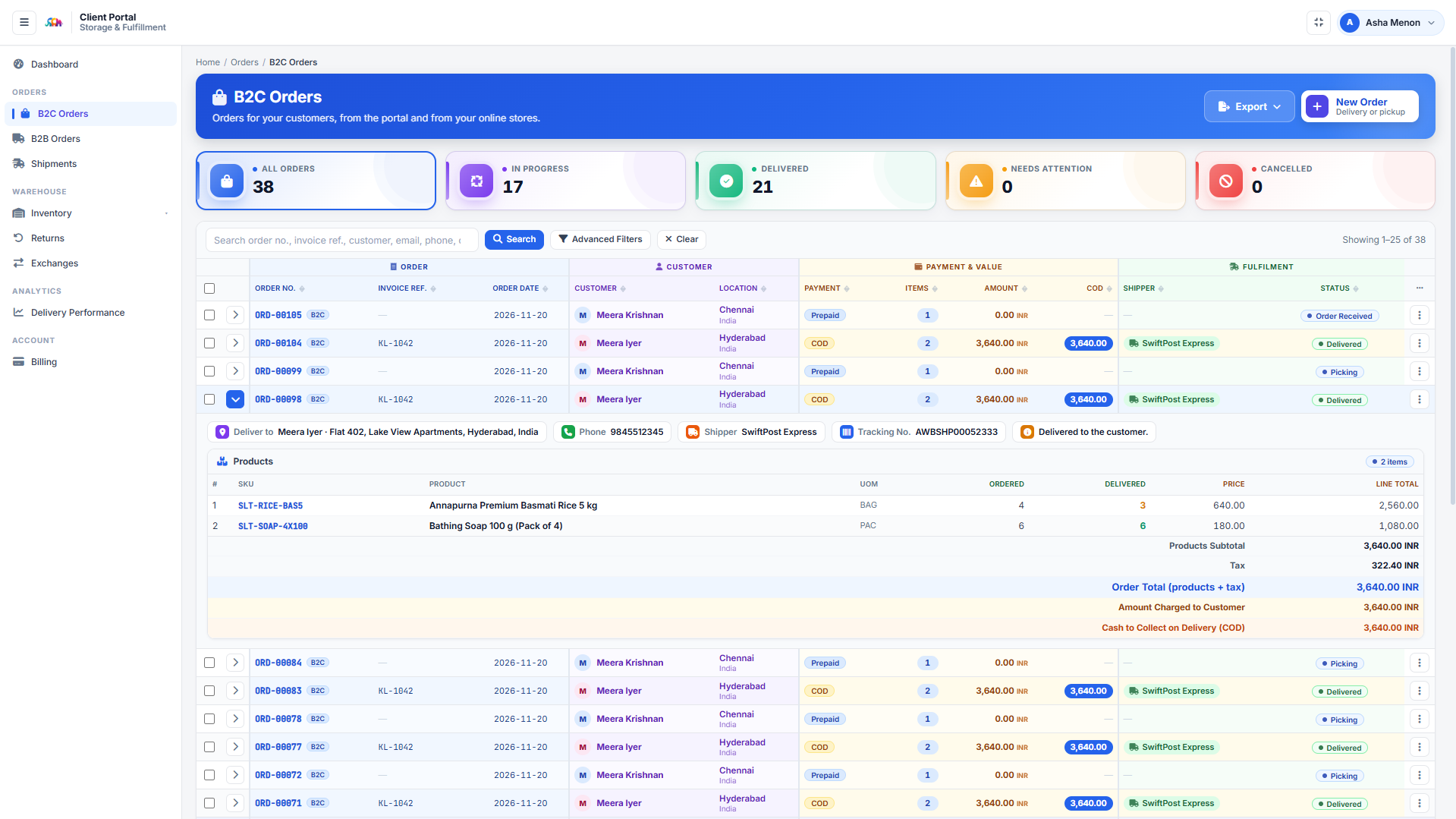
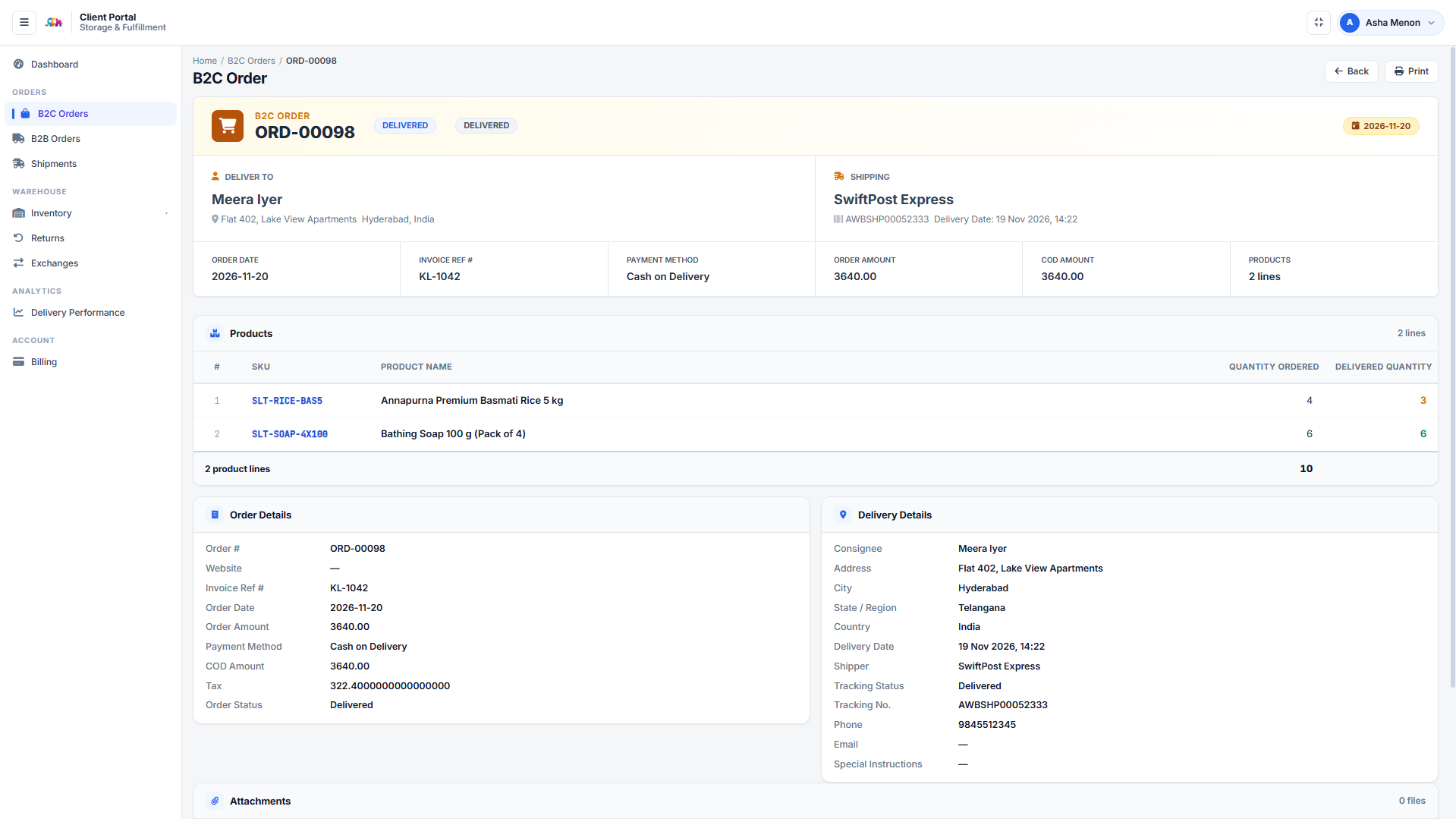
Carrier, airway bill, and the delivery date and time on the order itself, down to tracking status — so when their customer chases them, they answer without chasing you first.

The full order
“Did my shipment reach you?”Asked on every delivery

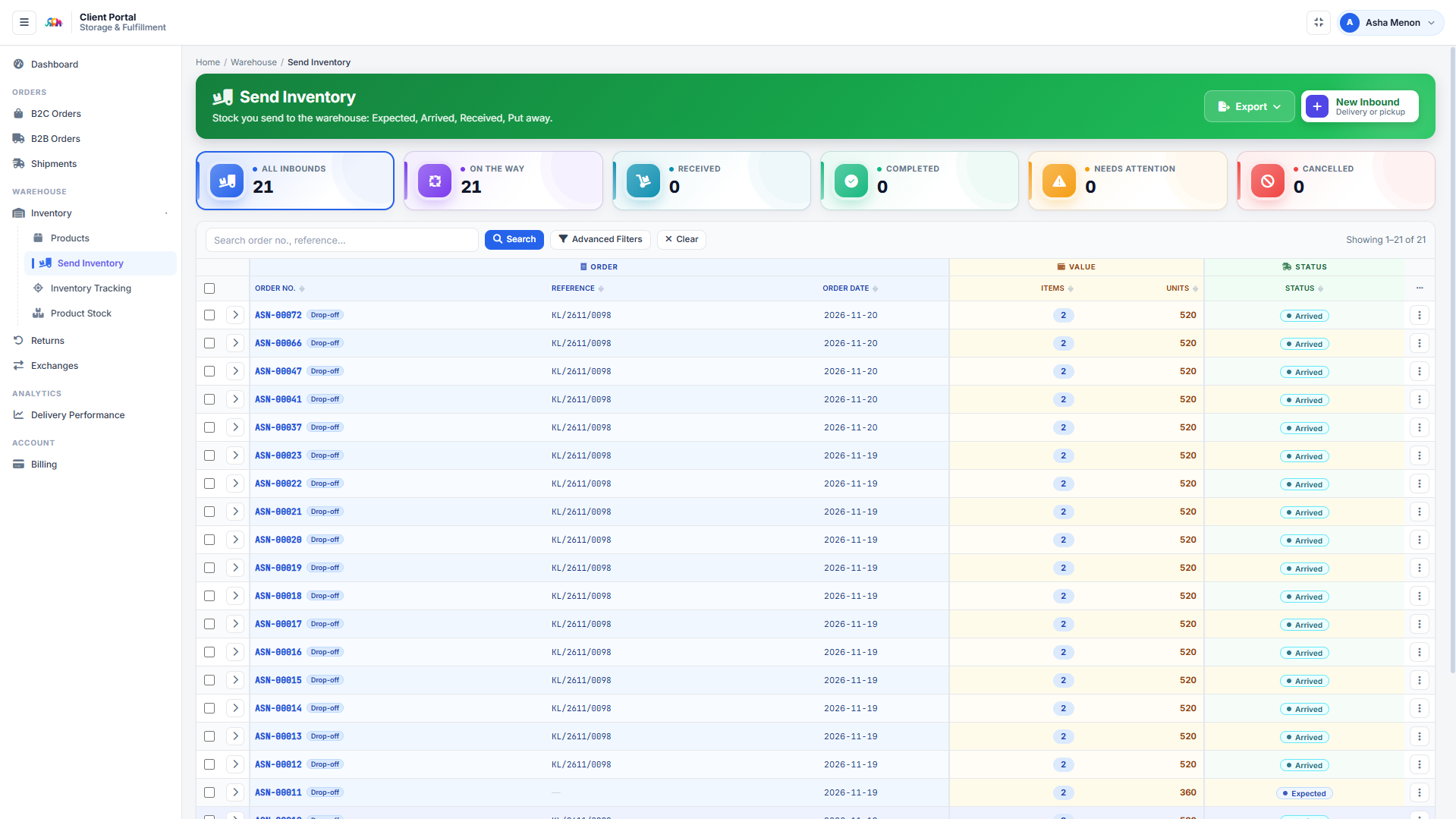
Inbound notices the client raises themselves, followed through expected, arrived, received and put away. Nobody has to ring the warehouse to find out whether a vehicle landed.

Send inventory
“Can I sell five hundred of these?”Asked before every campaign

A client order is checked against free stock before it is accepted, and the refusal states the quantity actually available. That one detail prevents the argument instead of settling it afterwards.

B2C orders
“Who moved my stock, and when?”Asked after every count

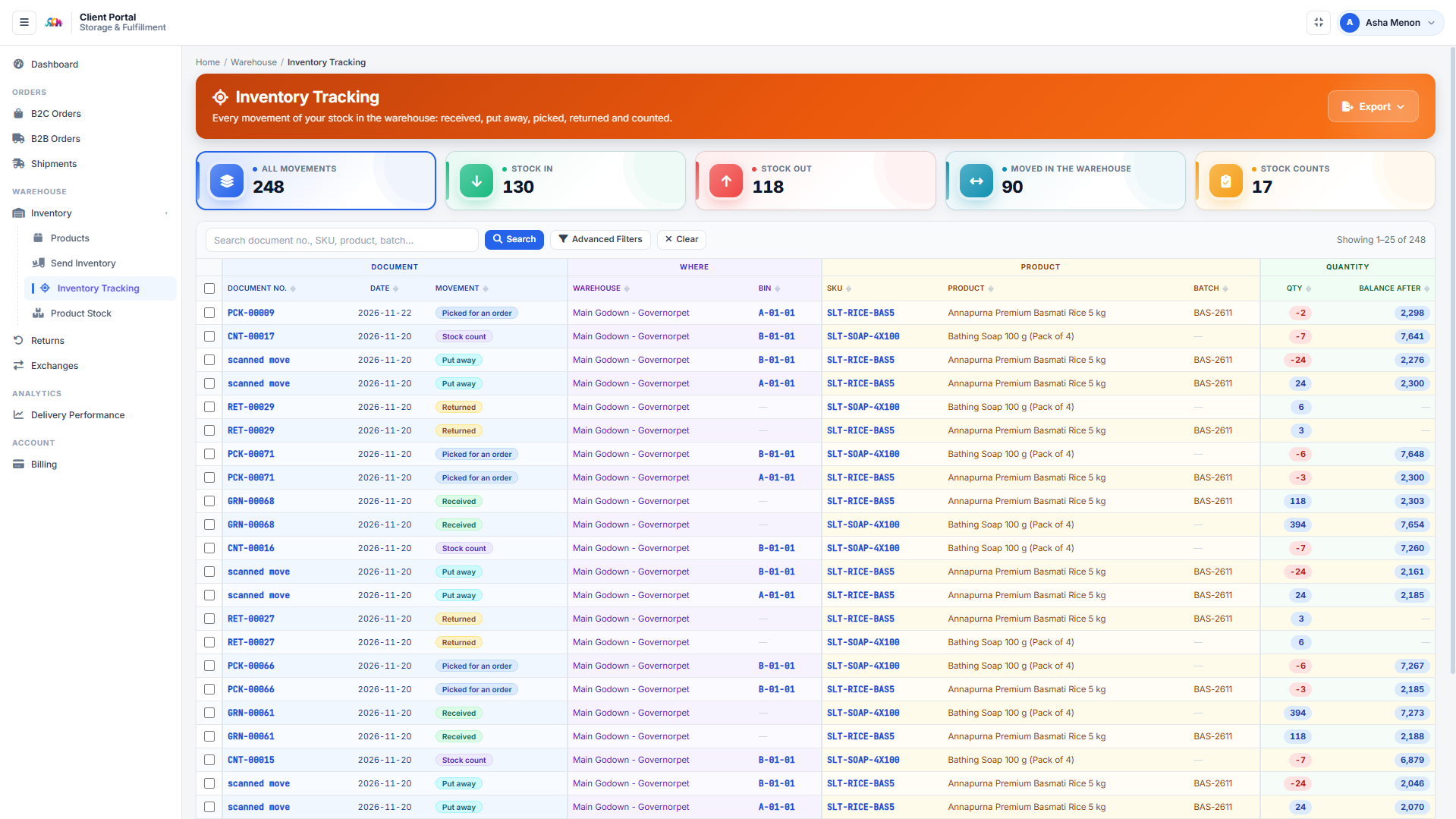
Every receipt, put-away, pick, return and count, with the document number behind it, the bin, the batch, and the balance left afterwards. Their goods are in your building; this is how they audit them anyway.

Inventory tracking
“What is this charge?”Asked every month

The invoice opens into the charges behind it, and each charge traces back to the movement that created it. A client who can audit a charge disputes far fewer of them.

Their invoices

It works the other way for you at the same time: fewer calls to answer, fewer invoices to defend, and a client whose daily routine now runs inside your software. That is what makes a 3PL contract difficult to leave — and it is usually what wins the tender against an operator still emailing a stock spreadsheet on Mondays.

Analytics

Four numbers, computed not configured

Three come straight out of the documents, so there is nothing to set up and nothing to get wrong. The fourth needs a cost model, and says so until you give it one.

Order accuracy

An order counts as perfect only if all three hold. That is why this reads lower, and far more usefully, than a fill rate.

  • Went out complete
  • Went out by the hour promised
  • Did not come back through our fault

Fulfillment speed

Split into three, because each segment has a different owner and a different fix.

  • Order to pick — a release problem
  • Pick to pack — a floor problem
  • Pack to despatch — usually the carrier

Space utilisation

By zone, by client and bin by bin, in volume, weight and unit count.

  • A bin with no stated capacity shows usage
  • …and no percentage, because that would be invented
  • Capacity refusals at putaway explain themselves

Client profitability

Revenue is known. Cost is not, so it is modelled — and until the model exists the margin is shown as unknown rather than as revenue.

  • Labour rate, rent per m³, packaging, standard minutes
  • Converted to one currency before any total
  • A client with no rate is named, never silently mixed in
Getting started

How you find out whether it fits

No long sales process. The fastest way to judge a 3PL system is to make it price work you have already done and see whether the invoice matches the one you sent.

A call about your operation

How many clients, how many warehouses, what you bill for and what you currently bill by hand. Half an hour, no charge, and often it ends with us saying the gap is smaller than you thought.

One real contract, loaded

Under NDA, we load one of your actual rate cards and a week of your real movements, and show you the invoice it produces next to the one you issued. No cost, and you keep the output.

One warehouse, then the rest

Prove it on a single site with a handful of clients while the others carry on as they are. Roll out when the floor is comfortable, not when a project plan says so.

Questions

Frequently asked questions about third party logistics software

A WMS answers where the stock is. A 3PL system adds the three things that only matter when the goods are not yours: ownership on every record, a contract that prices each kind of work, and billing that assembles those charges into an invoice per client. If you run your own stock in your own building, our ERP with warehouse management is the right page. If you hold other people’s goods and invoice them for handling it, this is.
Yes, and a client is always invoiced in their own. The cost model is kept in your currency, so for profitability reporting every figure is converted into the cost currency first through rates you enter by hand with the date beside each. A client billed in a currency with no rate is left out of the totals and named in a warning rather than quietly mixed in — a margin assembled from two currencies is not a margin.
No charge is invented, and the system says so rather than reporting the work as billed. That is deliberate: a silently unbilled job looks identical to a billed one on screen, and the gap only surfaces when revenue is lower than the floor activity suggests. The billing analysis report has a dedicated view of work done but never charged, which is usually the fastest money a 3PL operator finds.
No. They are your accounts and your negotiated contracts — the platform selects and books through them rather than reselling. Shopify and WooCommerce are spoken natively, most modern carrier APIs are covered by a generic REST adapter configured per carrier, and a carrier with no API at all is a first-class option where the clerk records the pre-printed waybill number.
Yes, through a portal where they see their stock, orders, shipments, returns, invoices with the charges behind them, and their service scorecard. Order entry and inbound booking are switches you turn on per client rather than defaults, because both reach your floor. Isolation is enforced twice over: queries filter by the client id taken from the session, and an interceptor fences portal logins inside their own area.
The variables are the same as any warehouse go-live and neither is software: whether your bins are named and labelled, and how clean your item master is — weights, dimensions, case quantities and pallet build drive bin capacity, gate passes and per-kg or per-m³ charges. The piece specific to a 3PL is loading each client’s contract and rate card accurately, because that is what every charge is priced from. We scope those three before quoting a date.
Both halves, on one ledger. The order fulfillment side covers everything from a channel order arriving to the parcel being booked with a carrier: allocation against free stock, the seven picking strategies, packing with real and volumetric weight, rate shopping and despatch with tracking written back to the storefront. The warehouse side covers receiving, putaway, bins, counts and pallets. They are not two products with an interface between them, which matters because the commonest failure in third party logistics software is a fulfillment system and a billing system disagreeing about what was actually shipped.
Yes — that is the premise. Stock is keyed by client, item, warehouse, bin and batch, so there is no such thing as unowned stock, and pick sheets are never mixed across clients. Item rules can be set generally, per client, or per client in one warehouse, and a contract rate line can apply to just one warehouse. Each client is billed in their own currency, while the cost model behind profitability reporting stays in yours.
A client is three things: a client record, a rate card, and a channel connection if they sell online. The rate card is the part that deserves care, because every charge is priced from it — and the conditional lines mean you can price a container differently from a pallet, or B2B differently from B2C, without maintaining two cards. Item rules can be set generally, per client, or per client in one warehouse. The storefront connection has a Test that proves the credentials before an overnight run does.
Not necessarily, and we will say so if you should not. If your WMS runs the floor well and the pain is commercial — billing, SLA credits, client reporting, profitability — then the honest answer may be to integrate rather than replace, and that is a smaller piece of work. What does not work is running a warehouse system and a billing spreadsheet side by side and hoping they agree; that is the arrangement this product exists to end.
Related

Where to read next

Several of the decisions on this page have a guide of their own.

Load One Client’s Rate Card And See

We take one of your real contracts and a week of your real movements, and show you the invoice it produces — before any commitment, at no cost.